Welcome

Lifedrivedoc.com began as a place to talk about the Lifedrive. It soon became apparent that it was much more than that. Since moving on from my Lifedrive, I am engaged in more avenues of technology. That technology has intersected with my professional life - Medicine as well as my social life.

As noted above, the blog is about a lot of things in relation to technology. If you are looking for Lifedrive related material, I am currently dividing the blog so that those searches will be easy for you to find. Most of them will be pre 2007, that should help. Additionally, if you are looking for the links that used to be on the left border. They will be back up in a different format soon. I do enjoy reading about new things to do with the Lifedrive, so you can feel free to let me know about those. I will also post those on the site.

If you are having trouble getting an RSS Feed, click on the feed link below or type this into your reader: http://feeds.feedburner.com/lifedrivedoccom


Enjoy.

Tuesday, July 11, 2006

NEWS: Is This The End Of the Road......?


The Palm Papperazzi is all over the place on this one. Brighthand reports that the Palm Lifedrive 1 may be at the end of its cycle, but the official word is "no." While PalmAddicts is reporting that it may be just dead, with no replacement in site.

Brighthand's Ed Hardy

Palm Addict's Joshua Burdick

Sentiment running high


If it is the end, then this will be a sad day indeed. I have enjoyed and continue to enjoy the overall product, despite its shortcomings. Might we see a solid state version of this device in the wings? - LDD.

Sunday, July 02, 2006

Lifedrive Essentials -- Which Memory Do You Serve?

I have owned the Lifedrive for almost a year now and I must say that I am pleased with it over the past 6 months, mainly because I have not put a lot of software on the device and because I have not hotsynced the device in almostthe same length of time. However, this weekend, I am going to have to bite the bullet and go through the hotsyncing process again. Why? Well, I have just discovered that all that glitters is not Gold.

One of my favorite applications, SplashID has its main data file stored in the Lifedrive's memory. Essentially, I usually store and run the program from an SD card. Since it is encrypted, I felt that it would be safer to have it on the card than on the machine. Well, I copied the sd card to my regular Tungsten T and found that all of my entries were not listed and that when I removed the sd card, the icon and the program were still on the lifedrive. Perhaps a sophomoric error - and I can just about hear the jeers and snide elements of the Palm Programming community having a jolly good laugh - but I was able to do this with another program, TCPMP. This program is an open source project ( a brilliant program by the way, as is SplashID), that is used to watch videos on the Lifedrive. Once stored on the SD card, it can be run directly from the card. I decided to test out my theory that I have been deluding myself all of this time by thinking that the program was self-contained on the SD card and not in the Lifedrive. I downloaded an addition to the program that allows you to view files stored in the .MP4 format and placed it in the same SD directory as TCPMP. I then clicked on the SD stored icon and I was able to watch the .MP4 video without a problem. However, when I shut down the machine and hit the icon in the Lifedrive's main memory, I could not watch the .MP4 file. Thus the question, was the Palm running directly from the SD card or was it running from the Lifedrive main memory when the icons were clicked?

Why is this so important? Well, if you are like me, your world on the Lifedrive has changed dramatically if you directly upload your .PRC files directly to a directory called /LAUNCHER on an SD card as opposed to using the hotsync or Lifedrive docking pathway. The former is an exercise in patience while the latter is an exercise in forgiveness. The latter tends to crash your Lifedrive's hard-drive more frequently, while using the ubiquitous hotsyncing tends to take longer than anticipated and can be brought to a dead stop if it finds an error. But all of this may be irrelevant if the Lifedrive is actually storing the data in the main memory - particularly for SplashID. As the saying goes, as the Lifedrive goes, so does my peripheral brain. Thus tonight I will have to back up everything so that I can preserve all of the passwords that I cannot possibly memorize.

Another reason for backing up the old machine is the fact that it is begining to slow down and the On/Off switch is doing a few fancy tricks that it has not done in over 6 months. All of these little things spell HARD RESET coming down the pike. Although some of this derision may have been self inflicted. Upon perusing the Palmaddict site I ran into a few programs that I thought would be brilliant to have in my mobile brain. Medical essentials such as FIFA FOOTBALL and PAC-MAN, along with a memory game all enticed me to the download front. Again, applying my /Launcher direct insertion on the SD card, the programs ran flawlessly. I could not see any remnants of them after I finished using them (Zfile and other scouring programs), but a funny thing started happening a few days later. Soft-Resets started occurring with a few. So I began deleting all except FIFA and that appears to have stopped the carnage. However, there is still a little sluggishness to the machine that I believe would be remedied with a hot sync. Additionally, it would seem appropriate to finally upgrade the operating system to v 2.0 as others are begining to find it a bit more stable.

If anyone has any insights into this dilemma, I would be very much appreciative. Below is a list of some memory insights that I have found over the past year and a few suggestions:


1. Splash ID - Possibility to run from the SD card, but uncertain if the data is stored only on the Lifedrive memory or the SD card.

Addendum: A thread on the Splashdata message boards on Yahoo seems to address this very problem. The data is stored in the Lifedrive main memory, but you can backup the main data file to an SD card, but it will not run from there. Check out the Yahoo Message board for more details.

2. TCPMP - I think it runs directly from the SD Card. The two versions that I have on the machine and the SD card appear to act differently. I used to have this in the main memory only, but I found that it kept on crashing after exiting. When I moved to storing it strictly on the SD card, the load times were a little slower (proof that it was running directly from the card?) but there were no crashes and the program ran smoothly.

3. pTunes - A very interesting discovery on the podcast trail. If you listen to a podcast or a song from the Lifedrive itself, you cannot fast-forward to skip from ie. 00:20:00 to 00:25:00 for example ( I think that this is better explained as intrasong / intrapodcast/ intrafile fastforwarding) , pressing the circular key forward will send you to a different file/song/podcast. However, if you store the files on an SD card and run them from there, there is an increase in speed by almost 50% and interfile fastforwarding is simple, fast and accurate.

4. MobiOffice - Storing a copy of all data files on an SD card (found in the directory /Programs) will thwart the need to hotsync your data and provides a good backup source that is accomplished in seconds rather than minutes. Additionally, you have the freedom of updating or not updating the files which can take a long time if you hotsync.

5. Printboy - I have not been able to get this to work with the Lifedrive, regardless of where I load the file. Even with hotsyncing, this thing just crashes.

6. Lifedrive drive memory - Probably best served by not using any more than 80% of its 3.8 gigabyte capacity. More than that and I have found sluggishness. Additionally, I have not found this to be a very good place to store files or to run programs from. It is what it is! A multimedia storage center. You can apparently upload gigabytes of photos, videos and sound files and address them using TCPMP or pTUNES without much of a problem, ie crashing. But running software from the area is like flying across the Bermuda Triangle in a Cessna.

7. MobiDatabase - Storing all files in the Lifedrives' main memory is your best bet. Storing them on the SD card is another exercise in patience when the program addresses the database. The beautiful, yet feared sound of ker-clink is met if you try to store your file on the 3.8 gigabyte space, rendering your database dead! Ker-Clink - the sound of a soft reset - is not readily found if the files are stored in the main memory however. Thus backing them up to the SD card is probably best.

8. Control -- The act of waiting for others to try out a piece of software before deciding to jump into the waters and loading it up on your Lifedrive.


I hope this helps. I am thinking about putting up a few basic Lifedrive survival tips, since I think that I can now help a few people from falling into despair when the Ker-Clink monster eventually arrives.

LDD.

PS. Thanks to those of you who have written to me in regards to the Lifedrivedoc.com beta site. As you can see I took the site down although I liked the design of it and spent a long time trying to get it perfected. The problem was not with the website, which was a beta - (the final site WOULD not have had that bawdy flyer) - but I ran into some issues with the ISP that could not be resolved easily. As soon as it is completed, I will let everyone know. Again thanks for your support.

LDD.

Addendum2: A brief note about some communication I had with Michael Verive, he is the author of NSBASIC for Palm OS. According to Mike, all of the Palm software is loaded into the main memory of the Lifedrive before it is run. Some apps which are written in NSBASIC will look for a file that is installed into the main memory of the Lifedrive called Runtime. If the file is absent then the program and usually the Lifedrive crashes. Many applications are now being written as FAT APPS, containing their own runtime program. This makes some programs run better than others, mainly because they do not have to look for the NSRUNTIME program of which there are many versions. Thanks Mike.

LDD.

Wednesday, June 28, 2006

Palm Settles Xerox Lawsuit. Can We Get Graffiti 1 Back?

It has been reported in Forbes this morning that Palm paid $22m to settle the patent infringement suit brought by Xerox. One wonders whether this will allow Palm to improve upon Graffiti 1, the simple, yet reliable input system that was ubiquitous in all of the Palm devices, including the beloved Tungsten.

Graffiti 2 is cumbersome on the Lifedrive and I would love to see the return of the old Graffiti 1 system in place. I was able to complete sentences a lot faster. Presently, I find myself returning to the onboard virtual keyboard for anything substantial. An updated Graffiti 1 system would be very much welcomed.

LDD.

Monday, June 19, 2006

Dr. Bikshandi creates a lean PDA.

Akin to the Origami mystique discussion, a physician in India claims to have created the first lean PDA for medicine. The device is apparently centered around preexisting hardware and is devoid of the bulky applications and proprietary restrictions that have closed the doors on progress thus far.

The article, published in India's Healthcare Management Express , would seem to be someone's reach for the spotlight if it were not for a few important facts. Dr. Bikshandi is a well respected Trauma Critical Care Specialist. Secondly, he actually presented a working model of the device to the Royal Society of Medicine in London! That's right, no vaporware here! A real, dedicated device. One would think that a picture or two would have evolved from this meeting, but alas, there are no pictures, but a lot of questions. According to HME, the device has the following characteristics:

1. Basic PDA functions: Calendar, Contact/Address book, meeting alerts and e-mail.

Obviously, until we see a working example, it will be difficult to comment on it. But it is nice to see some innovation still finding its way into the standalone PDA.

(Originally written in June, 2006).


Friday, June 16, 2006

MobiSystems Releases OfficeSuite 7.0

In what can be seen as an eagerly anticipated update, Mobisystems released OfficeSuite Classic and OfficeSuite Pro 7.0. In the Lifedrive community, Mobisystems has been a breath of fresh air in the Office Suite market, designing a product in Office 6 that worked right out of the "box," without the need to download updates or additional software to make it work on the Lifedrive. They introduced a filesearch system that was as much a copy of the windows explorer model that one could have and then gave away 4mb of ftp space per user to upload and download files. Now, version 7 has a few perks added to a product that almost appeared to be too good to be true.


First, they have reportedly sped up the file opening times which were significantly slow. They have maintained support for the usual office file types in native mode - DOC, TXT, RTF, XLS, XML, and CSV file formats, but surprisingly absent in the list is .ppt or the native powerpoint filetype. The RTF format is a nice one to have since you no longer have to use Word to type or import and send documents. You can now use WRITE which comes with Windows. Alas, there is no native support for the open source formats ---yet!

They have introduced predictive text in the word program and have provided 6 free language dictionaries - English, German, French, Spanish, Italian and Dutch. They also have a windows desktop companion to ensure that your documents are up to date - according to Mobi. Most of the time, I keep my files on an sd card in the event of a fatal crash, but this is still a good option for verifying and updating the files that are in memory.

There is now a direct print feature that supports printing from the Word document directly. This will require that PrintBoy is installed however. Charting is provided in the Excel product with -- according to Mobi -- excellent duplication of charts both from the desktop Excel program to the Mobiproduct and vice versa in native mode. I will be downloading this to verify that this is the case over the next few days. This will truly be a significant step for Mobi if this works out as stated.

They continue to use the Explorer type filesystem which I believe is one of the best ever. It is so intuitive and the addition of the ftp directory as part of the explorer type directory is seamless, logical and functional.

If there is a concern for the new product it is the new dependence upon third party vendors. Mobi 6.0 was a fantastic product because it incorporated a few unique additions that set the product apart -- the filesystem, ftp storage, crisp, clean and accurate rendering of documents without modifying the files and instant compatibility with the Lifedrive. Where there were weaknesses, Office 7.0 seems to be the correction factor -- Speed of opening files, printing from documents and the new direct native .PDF support.

Where the concern lies is in the latter two. They have apparently conquered the file opening speed problem (again, I will be testing this to see if this is truly different). But they are relying on third party vendors for the latter two issues. They are requiring that PRINTBOY is installed in the Lifedrive before the files can be printed. For me, I have not gotten Printboy to work on my Lifedrive despite the numerous times that I have tried. Infact, I gave up on this solution months ago and turned to saving things on an SD Card and opening Write, Word or OpenOffice to print it out. Hopefully there is a resolution to this particular problem.

Secondly, they are relying on an "opensource" third party program from Metaviewsoft called PALMPDF. This is a port of a previous program called XPDF, which is the original opensource pdf reader. More about this can be read here -> PalmPDF/xPDF. In a few comments on PalmAddict, many bugfixes were done in a version of PALMPDF published in february, which represented version 1.1. In November just 3 months prior version 0.8 was discussed in PalmAddicts. Metaviewsoft, located in Germany is doing what amounts to be a wonderful job in trying to get the Palm OS to work with PDF files and giving away the program, but I think that this is still a beta product and with the constant updating still appears to have issues. Metaviewsoft has released only free copies of the program, but this may change once the final product is released. Again, I am not criticising them for what they are doing, I think that this is a good idea for all to have this company create a standalone product like this, but I have some reservations about a major company such as Mobisystems taking a chance on beta software to be a part of their product. I think that I would have had more confidence if I knew that Mobi was creating the printing and native pdf software to run flawlessly with their products.

With this as the only flaw that I have noticed, I will be purchasing Mobi's updated package over the next few days and because it is a core product of mine, I will be giving a review of my experiences over the next few weeks. The pricepoints for the product are listed below:

Basic Office 7 (Docs, Spreadsheet, Slides, OfficeSuite Desktop and Font Convertor) $39.95, Upgrade $ 14.95.

Professional Office (
Docs, Spreadsheet, Slides, Database Professional, Paint, OfficeSuite Desktop and Font Convertor) $69.95, Upgrade $ ??? (Possibly 14.95).

An incidental note is made that the version of OFFICESUITE is 7.5. It would appear that they have been working on this one for quite a while. I am very excited to try out this new piece of software and I will be certain to send updates of my experiences.


LDD.

Tuesday, May 30, 2006

Concerns Raised Over Wifi

An interesting discussion is emerging (finally) in regards to the safety of wifi. An article, published by Mobile Tech Today brings to light the safety issues surrounding those short wavelengths that seem to have us all in awe.

Headaches, fatigue and irritability were the main concerns. One person in the article went as far to say that one should not install new wireless lans in an office, if it does not already exist. Although there is some caveat in regards to distances from nodes.

My take on this is quite simple. I use wireless access, but only minimally. Mainly because of my fear of intracellular damage. However, I must preface this by stating that I used wireless access minimally. I now find myself using it a lot more due to the fact that it is convenient and so readily available. However, I prefer to use Bluetooth as opposed to 802.11(a-g). This is mainly for security reasons and due to the fact that bluetooth lan shuts off once it has stopped transmitting. It is only on when it is transmitting or receiving information.

But having access via my Palm is one thing. Here I am willingly using the machine. But being an unwilling recipient of radiowaves is quite a different matter. Placing repeaters and nodes all over an office is something completely different. Most of the staff, patients etc., didn't ask to be bombarded by our radio waves and actually are unwilling guinea pigs in our high tech race. San Francisco has been having a field day putting nodes in small places to blend in with the environment. Some people are in an uproar over the entire audacity of company owners placing these devices in areas where we cannot see them, exposing unwilling recipients to wifi radiation.

To me, the genie is out of the bottle. You cannot go back and decide to hardwire everything. It would cost a lot more than money to attempt such a pullback. Perhaps we can take a cue from the cellphone industry. After all, when we talk about short wavelengths, the cell phone industry is the model that most people assume that we are talking about. Over the past twenty years, the cell phone industry has been fighting a winning battle convincing the public that cellphones are safe. They are winning because of the sheer number of people using cell phones today, with no appreciable increase in brain cancer rates. Ubiquity aside, the industry introduced -- although with great reluctance -- an SAR system to measure effective radiation levels of exposure to individuals. Such a system does not seem to be in place for our bluetooth or wifi counterparts. Additionally, the cell phone companies have been mandated to place their antennae well above the ground, away from people. Although I cannot understand why anyone would put one atop their apartment or how this affects people travelling along an interstate parallel to the apex of the antenna !!!

Thus, placing a wireless repeater, node or hub well above the patient population in an office would seem to be appropriate. In most hospitals, most of these things are poking out of the ceiling. I am not sure how safe that is, but it beats hiding it behind the geraniums.


LDD.

Thursday, May 18, 2006

RUMOR MILL: TX2 to have 4gig solid state memory.

PALMINSIDER.COM is reporting on a rumor that a new TX2 will be launched at the end of the year, featuring a 4 gigabyte flash memory. I won't quote verbatim the site, but I have put a link to it if you click on the title.

So, could this mean the end of the Lifedrive as we know it? Could it be that the TX2 was an experiment that won out as the more stable of the two devices?

As I stated in my earlier post, could we be at the end of the road for the disk-drive devices in favor of solid state technology? If Palminsider is correct, we could be seeing the TX2 as the replacement for the Lifedrive. Or does Palm have a surprise in store for us in the fall?

LDD.

Strange Wording on the Palm Website......

Perhaps I am being just a little paranoid, wishfully hoping that a Palm Lifedrive 2 is on its way, but I could not help but notice a strange thing on the Palm website. In describing the Lifedrive on the left side of the main window, there is NO mention of the word "Hard Drive!" Instead, the promo reads "Lifedrive Mobile Managers feature gigs of storage....."

Are they trying to tell us that the new Lifedrive will not contain a hard drive? Are we about to get the ultimate solid state or stable hybrid machine -with fast access times - that we have been craving? Or do I just have Treo 700p envy?

I think the people at Palm are very cautious about what they print, particularly on a World web page. It is my humble opinion that the word "hard-drive" was deliberately omitted. The next few months could be very interesting.

Full Text Below.

LifeDrive™ mobile managers feature gigs of storage and both Wi-Fi® & Bluetooth® wireless. Carry files from your desktop computer and access them wherever you go. Includes support for POP, IMAP and Exchange email, plus a voice recorder, MP3 player and more.


Palm Website

LDD.

Wednesday, May 17, 2006

Stuff Magazine Votes Lifedrive #1. Best Palmtop EVER!!!


Move over Treo, Stuff Magazine, Britain's leading tech magazine has described the Lifedrive as the "SWISS WATCH OF PALMTOPS" and voted it NUMBER 1 among ALL PALMTOPS EVER! That's right, our own beleagured silver device, with all its deficiencies, still leads the pack after one year. (Stuff Magazine Link to Top 10)

Given the Lifedrive's rocky start, I for one cannot live without the little device. Plane trips to CME's would be downright boring without my ability to watch 2 or 3 movies (full length) on a single battery charge (from the sd card and 1 movie on the lifedrive). Infact, my daily commute would be downright devoid of any worth without listening to Leo Laporte's TWIT, Amber MacArthur's In the Net, John Dvorak's Cranky Geeks or Firefly/Serenity podcasts. I can even get to listen to the BBC's 606 to hear about my beloved ARSENAL FOOTBALL CLUB (Tough night on the European front, but we'll get them next time). All this and still use the drive to run SMARTLISTOGO databases, my favorite PREGCALC software (detailed below), checking the call schedule and other apps that I've penned in DATABASE 7 and using the ubiquitous SPLASHID (A must have piece of software). When I've got a little free time, I can check my email, dictate a message to call someone later on in the day (and have it sync to the calendar) and NEVER worry about running out of space.

Oh, did I mention the ability to store 10 full length text books on both the SD and Lifedrive and still not a flinch in the memory bank?


To quote Stuff magazine, which gave the device 5/5 stars:

"Despite a mediocre showing in recent tests, the LifeDrive is the most exciting thing to happen in the world of palmtops since, like, ever. It’s the first proper UK handheld to feature a hard drive, and PalmOne has done us proud by sticking in 4GB for our DivX vids, MP3s and documents. The hardware’s beefy but the build quality’s in luxury watch territory and, as a do-it-all device, it can’t be beaten.

KILLER FEATURE That built-in 4GB hard drive gives you plenty of flexibility when it comes to storage. Ah yes, and that razor sharp screen…"

LDD.

Thursday, May 11, 2006

New Releases for Medicine and Some Questions

Over the past 2 months, there have been a few newly released programs for the Palm Pilot. I have chosen to look at two interesting programs which have caught my attention. However I do caution that I have not tried any of these new releases mentioned and they are listed for informational purposes only.

I have a few questions which I will pose to the companies writing the programs, mainly concerning the compatibility with the Lifedrive.


Davis's Drug Guide with Auto-Updates
Publisher: Unbound Medicine.

- This program will reportedly ship with a total of 9 indices, 16 appendices and include a collection of lab values and dose calculations. Life threatening side effects are visually enhanced for quick reference. In addition, the company states that it will cover almost 5,000 drugs plus herbals in its database.

- Update via wireless, internet or hotsync (connected to the internet).

- Winner of the Handango Best Industry Application Award.

- Price point: 49.95.


Obstetrics Gynecology & Infertility, 5th Edition
Publisher USBMIS.

- This is an interesting title and is supposedly able to cover information for both immediate bedside care and subspecialty information in Maternal-Fetal Medicine and other GYN subspecialties. The company reports that the program contains over 200 tables, flowcharts and figures. Information is bookmarked and it is possible to examine operative reports "for support information."

- Attention is paid to the beginner's medical Spanish section. I wish I had this a few years ago :).

- Price point 29.00


Discussion:

Although I have not purchased any of the above yet, I think that both have tremendous potential. A few of my peers have been using the Davis product and they have enjoyed the information provided. Additionally, many have compared it to Epocrates and believe that it is faster and more robust because it has none of Epocrates additonal software. If you own a Lifedrive, this could be especially critical. I could not find out if the Davis product is completely loadable on an SD card. It states that it is SD card compatible, but caution that 6mb of memory is needed on the handheld.

The product has a 5,000 drug database, which I presume is kept in the PDA memory and hence accounts for the speed of the product; however I do have a few questions. Since none of my partners own a Lifedrive it is difficult for them to answer. One question would be the upgrade cycle. Davis offers a 12 month update cycle for the initial payment. What happens after that?
Secondly, the authors are Pharmacists. Believe me, I love my Pharmacist, without them I would be in trouble, but I have a question about how much detail will they provide -- as in too much detail about a specific drug. One of the advantages --and perhaps disadvantages-- of Epocrates is that the information is concise and to the point. Perhaps to the point of leaving out very important information, but I can get an answer very quickly without going through minutiae. But I cannot knock a product until I use it and I probably will purchase this, given its glowing reviews and the fact that I will not have to Hotsync to update.

USBMIS's product is enticing. I like the apparently concise renditions shown on the website. Apparently quick reference functions and charts are easily accessed through a minimum tree system. And the price point appears very interesting. This is one that I could see myself purchasing very soon, but I would love to see a few reviews first.

Again is the question of the updates. USBMIS gives 12 months of updates, with "free" usage of the program without updates following this. Obviously unknown is whether another subscription is needed to get any new updates to the program.

Secondly, the card issue is somewhat ambiguous again. " 17MB of available memory (additional main memory may be needed when installed to memory card*)" ??? If I am reading this correctly are they saying that the main elements of the program have to be transferred to main memory and then erased again? 17 mb is a lot of memory, even for a Lifedrive. You are certain to run into the "last 32mb vortex" (This is a veritable Bermuda Triangle for the Lifedrive where programs which are not written correctly to address the memory access give the Lifedrive the proverbial "clink.....grey screen" or Soft Reset).

However, this is one program that I will try, since it sounds very useful and the price point appears competitive. Naturally, I will let you know how this turns out.


LDD.

Interesting Robot Kit


Well, on those lonely nights when you can find nothing to do with your old palm pilots, an interesting solution seems possible. If you recall, I noted that Medtronic was using revamped Handsprings to control intrathecal drugs (By the way, I had the opportunity to see one of these devices first-hand last week....Truly Amazing!), well a few industrious and ingenious individuals at Carnegie Mellon University have decided to make a Palm Pilot Robot Kit (PPRK).

On the website, there is detailed information on creating one of these. As always, click on the title to take you there. At the site, there is information on the theory of robotics and links to other sites that include software and hardware. Some of the software is interesting and I was happy to see that a free copy of Code Warrior Lite was still available for download.

LDD.

Friday, April 28, 2006

My Highly Recommended list

It's not everyday that I post about another blog that I think that you should bookmark. However, I must say that two Palm sites stand out for their timeliness of reporting and their unabashed, unbiased reviews. In addition, I would like to recommend one technology site that is really at the forefront of the latest breaking tech news.

Sammy at PalmAddicts is just one of the greatest people you will ever have the chance to meet on the web. He created a site a few years ago, based on a "hobby." That site now has over 40,000 hits per day and has become a mainstay for all Palm enthusiasts. Sammy is extremely generous and offers the 24 hour blog as a way to stay in touch with his hobby. However, he has been known to throw open the curtains and let others write for his blog. Infact, he has published an invitation to have people sign up and write for the blog in order to make it one of the biggest blogs in the world. He is also having a meet-up in New York City in July. It was after seeing Sammy's site, PalmAddicts and another smaller blog (in addition to my early frustrations with the LD) that encouraged me to do this site. I owe a debt of gratitude and would like to say thanks to Sammy for writing a small article about my site on his blog last week. There was an avalanche of hits and a few nice words sent to me -- Thanks.

However, the gratitude that I have for PalmAddicts is not just because of the nice write up. It is genuine. I visit 3 or 4 blog sites almost religiously, mainly because of the content. But I also visit because of the quality of not only the writing, but the genuine appeal of the writers. I had the chance to meet with the owners of ENGADGET last year and I could not believe how nice Peter Rojas and Ryan Block were in person. They are a throwback to the late 90's but with a twist of reality. They embrace the future with a hint of self-deprecation that was lost in the hey day of that bygone era. At the meet-up they gave incredible advice to newbies and I'll never forget Ryan's request that if you have something to write/say, just do it and worry about the money later. By the way, Peter uses a Palm device and loves it.

A site that I have listed on the links has now grown to the Highly Recommended List status. It is LifeDriveForum.com I have found this site to be a fascinating one, appealing not only to my desire to have a discussion about the Lifedrive, but for the sheer level of interest brought about by many of the indendent writers on the forum. The discussion is intelligent and on a level that does not make one feel silly that you asked the question or wish that you could "talk to a grown-up." They have just begun a new forum on the potential for the Lifedrive2 and the rumors are really quite interesting.

So, if you get a chance, I strongly recommend the following websites for your consideration:


PalmAddicts


Lifedrive Forum


Engadget


* I have not received any reciprocal endorsement, financial or otherwise in reference to the above recommendations. These sites are listed as a result of my own research and my own opinions.

LDD.

Monday, April 24, 2006

Lifedrive: Lookout for the Google Calendar Palm API

As you may know Google Calendar is now out. There is a lot of potential for this program andit is obviously a beta product at the present time. A trip to PalmAddicts points to an article that may be the entry point to having this product sync with your Lifedrive or other Palm product.

Yahoo already has a wonderful calendar program, but input is somewhat cumbersome and appears to have a lot of commercials which slow down the process of entering simple things.

The Google calendar is clean and purports to be able to link dates right out of your email and other products to follow. We will be on the lookout for this program, because my sources are telling me that Google is releasing the API for Calendar. This is basically the engine. If you have ever used GoogleMaps then you will know the potential for this product.
I would expect a Palm support product very soon.

Link to the PalmAddict article: Syncing the Palm with Google Calendar

Wednesday, April 19, 2006

LIFEDRIVE: PREGWHEEL.


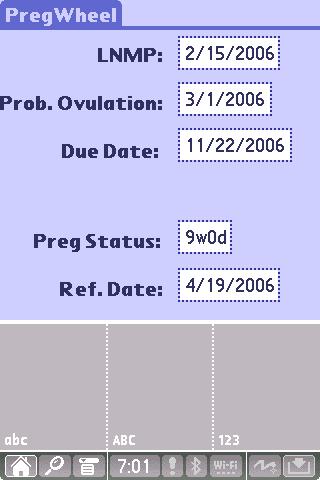
Pregwheel is a simple program written by a person calling himself Slade. Unfortunately, the website listed, Sladeandmegan .com appears to be a commercial trap. I am not certain whether there is a misspelling of the URL or if this is actually the site.

Anyway, I have had the opportunity to use quite a few OB programs in the past, but many are simply cumbersome. One particular program that I utilized a few years ago, before my Lifedrive days, promised to do just about everything: Store patient data, calculate dates, post reminders etc. Unfortunately the writer charged $19.99 for the honor and kept on updating the program almost every month. The data was not transferrable and I spent a lot of time reentering the data every time he found a glitch. I felt as if I was paying for a beta product.

Pregwheel is a program that has replaced the cumbersome wheel that I usually carry around (and lose :)). It is a freeware program and can be found on PDAMD.COM or www.healthypalmpilot.com. It doesn't do alot of fancy tricks and it is so deceptively simple that I thought that it would be worth a shout on my pages after having used this for a few years.

Essentially, this program does exactly as it states. It substitutes for a pregnancy wheel. You put in your LNMP and your reference date (ie. today) and it produces a host of information, including the date of probable ovulation, the estimated due date and of course the pregnancy status (ie. number of weeks pregnant).

However, where this program excels is in its simplicity. The program shows only 5 lines of data:

LNMP
Prob. Ovulation
Due Date
Preg Status
Ref. Date.

That's it!

But You get the added bonus of being able to enter all but the Pregnancy status as your initial point of entry. This is a God-Send when you have an ultrasound report giving a due date that is off by several weeks. You can even change the reference date to reflect how far along the patient was when the ultrasound was taken.

Given the days of Google, where simplicity and an uncluttered screen are the order of the day, I have found this program immensely helpful when someone walks into the office for the first time. It's easy to use Nagel's rule to calculate the due date, but attempting to figure out how far along the patient is without using a wheel is a little more complicated.

This program has been out for a very long time, but it still stands the test of time and works extraordinarily well on the LIFEDRIVE.

LDD.

Tuesday, April 18, 2006

Dalhousie Univ. in Halifax on Handhelds

I have just completed reading a wonderful article on handhelds in medicine. The University of Dalhousie, in Halifax, Canada published "suggestions" for their students to purchase a Handheld.

The article is heavily tilted toward Palm. My favorite quote from the article, which by the way is filled with recommendations for Medical Students, is this one:

"Don't go low-end. Although it's always a temptation to buy the lowest-priced unit, remember that this will likely become one of your most essential reference and organizational tools, and it will take a beating. Look for sturdy, "corporate" style units rather than flimsy consumer-grade ones."

Do I hear the chimes ringing for a Lifedrive? Or maybe a Tungsten, still a wonderful machine.

As always, click on the title to take you to Dalhousie University's website.


LDD.

Friday, April 14, 2006

Another wonderful article about Palms.

This one is from Canada and it details the physician addiction to Palm and basic hand computing. Yes, I think they get it! It is too true that not having a handheld will put you at risk on rounds, if you are still in Residency.

In private practice, I cannot live without my Palm. So much so that I have two!!!! In the next few weeks I am going to place a wonderful app that I wrote for Smartlistogo for pregnancy reminders. It has been a life saver, literally !!!!

Presently, I am trying to write a conduit for publishing handheld databases directly to a printer and directly to Access and Excel. It's already been done, but the output is usually a disaster, requiring time consuming formatting.

In addition, I am trying to find the time to write some stand-alone apps that will be available on the startup screen of the Palm and completely independent of Hotsyncing -- a chore that I completely abhor !!!!

Anyway, enjoy the little article from Canada. As always, click on the title.

LDD.

Wednesday, April 05, 2006

Congratulations Arsenal

Nothing to do with medicine, but just a short ditty to say well done lads!
A fantastic win over Juventus to go to the semi finals of the European
Cup for the first time in our history.

Now Thierry, Stay with us old chap, we need you.

LDD.
Thursday, March 30, 2006

Future Articles....

I have owned my Lifedrive for approximately 8 months now and although I have mixed feelings about it, I cannot live without it. I am now using it more at work than ever before and I think that I have finally cornered the stability issues.

Over the next few weeks, I will be posting a few articles in regards to software and offering a few ideas that I have garnered over the past few months in regards to stability. Not all of this will be about medicine, although that is my primary objective. Some of the recommendations may surprise you and I am going to make a listing of what I believe are Must-Have programs that work well on the Lifedrive. These include my favorites epocrates and mobi office.

Coinciding with this, I will try to publish some of the long-awaited database apps that I have been promising for the past few weeks. Using two free websites, I will try to post these in conjunction with my upcoming articles.

So, look out for titles begining with LIFEDRIVE. I hope that these will be both informative and helpful. And if you have any Medical databases that you would like to donate to the cause, please let me know.

Thanks as always for your support.


LDD.

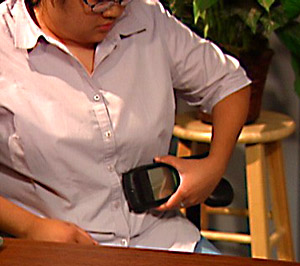
NEWS: ABC 7 Chicago on Lifesaving Devices


ABC 7 Chicago today posted a wonderful article and video titled, Lifesaving Devices. The main feature is another modified Handspring device used to monitor a man with congestive heart failure. The device, not unlike the one featured in one of my previous posts a few weeks ago, monitors the extracellular fluid levels (This would be something to ponder, how does it do this)? and automatically displays the correct amount of diuretic the patient should take.

The article and video go on to discuss how the PDA is making life a little easier for Physicians to obtain information. The video shows a Physician looking up information on a PDA (Medcalc) and giving BMI measurements, presumably to go over risk factors etc. Very nicely done. Nice article.

I think there is room for the Lifedrive (SKU: 1044NA ) somewhere in there :).

The video can be seen here:

Video

To view the article, press on the title of the story above, or you can go to this link:

ABC 7 Chicago

Sunday, March 26, 2006

Is this the New 700p?

There are rumors that the 700 P, Palm's new addition to the Treo line could be released in April (I have to question why not on Palm's tenth birthday)?

It looks a little metallic, but I am encouraged by the fact that it will sport 128mb of onboard memory. With the advent of the 1,2 and 4 g SD cards, this is looking very attractive.

Now if they could just get a GSM version, life would be good.


LDD.

Ed Hardy on Palm for Linux or Is Palm falling back into the same pattern again...?

Ed Hardy over at Brighthand (Click on the title to take you there) remarks on the lackluster reception that Palm for Linux has received. He was able to talk to someone on the Palm Hardware side and did not hear of any support for Linux, but for the Palm OS. He surmised that they will support Palm OS Garnett (The current rendition) but may not support the Linux version.

Obviously, this is not a good sign. With the exception of speed, which must accompany any change incorporating a Linux based platform, Palm appears to be hell bent on staying with Garnett. Now let's face it, Garnett has poor multitasking power, crashes at the sight of integration with a web browser; hangs during some bluetooth connections and is power unconscious when using 802.11 b.

Additionally, Garnett is not capable of really dealing with NVFS (Nonvolatile file system) or Fat-32 systems very well. Plug Garnett into a Lifedrive and you get the weakpoint for the operating system magnified to 4 gigs. The 4 gigabyte of storage is held nearly useless when the memory is addressed by most software programs. You access the drive's data from within a program at your own risk. Storing files, ie. movies, documents etc is fine, but accessing them is not without playing Russian Roulette. You have to transfer the files to the internal memory, but can get away sometimes with transferring them to an SD card (ultra preferred) without crashing. It is not a hardware glitch, it's GARNETT! The present operating system is not used to having files change their position on a drive - in this case. It is used to an orderly distribution of files that it can read and expect to read with the memory locations staying static. This is the real problem with the Lifedrive and now the Tungsten X and the model preceding it. This was so problematic that the Documents-to-go program that came preinstalled on the Lifedrive had nothing but trouble attempting to access and save files. A solution taken from the Tungsten X had to be employed. However, this was not brought to the forefront by Palm.

These file issues can be best addressed by using a Linux platform. Apple has shown that moving to a Linux platform (OS X) was unbelievable for the desktop and since Palm appears to be moving in the same direction, I would think that this will hold true for the Palm. When one considers that Linux is an underlying operating system, the possibility of running PALM OS on top of Linux would appear to be a simpler task than reinventing the operating system from scratch. It would offer better compatibility and lead us into the next generation of products.

Without Multitasking, I find it difficult to understand how Palm plans to excel in the handheld phone arena without an operating system that can multitask. The main task of course for the Treo line would be to stay on-line and look up addresses, documents etc and possibly get on the phone. Picture this scenario:

The busy business person receives a call while in the car with their bluetooth enabled Treo. A document is needed in the office immediately for a presentation. The individual stays on the line, finds the document in Documents-to-go or my favorite Mobi Office and accesses either EVDO, GSM or other fast network access (while remaining on the phone via bluetooth) to send the 240k document. The document is received and the individual closes all connections.

This scenario requires a number of things:

1. A fast processor. Intel has been solving that problem. The Lifedrive is a good example.
2. Good battery life. ie. Low power consumption.
3. GOOD MULTITASKING ABILITY.
4. DUN.
5. An operating system compatible with 1-4.

We currently do not have this. Garnett will be slow and cumbersome if we were able to do the above at all. This is why Palm needs to move along and stop living in the past. I wholeheartedly agree with Ed on this point. The new "Q" from Motorola is about to change everything. It will be running Windows Mobile and the reviews are already quite strong from those who have used it. Palm can ill afford to sit around believing that Garnett will save it! I believe that Palm has gotten a little lucky on the Treo front. They have a device created by Handspring and have perfected it to the point that mainstream America has caught on. More importantly, business has caught on and are switching from RIM to use it. I believe that there may be some reluctance by Palm to rock the boat. Here they have a device that everyone has come to know and love. Unlike the consumer market where many would not mind the change, the business world prefers stability. However, stability at the expense of innovation, speed and convenience may not be in Palm's best interest.

As a Professional who depends upon Palm, I think that I may be one of those people to whom Palm is worried about rocking the boat. However, I must say that improvements need to be made and quickly, especially for those of us in the health profession. I have chosen to accept the Lifedrive as a stage 1 development, but if the same issues occur in Lifedrive 2, I will not be so polite. I would venture elsewhere, despite my reluctance to do so.

Palm has shown that they are capable of innovating. The original Palm Tungsten T was a dramatic machine. I have tears in my eyes thinking about the very first time I set my eyes on this machine. It was slick, small and powerful. This type of innovation can be done, but Palm needs to accept the challenge and stay ahead of the competition. I love this company and I want to see it succeed.


Emotionally and Unabashed,

LDD.

Wednesday, March 22, 2006

A few things.....

Thanks to those of you congratulating us on the potential site LIFEDRIVEDOC.GOOGLEPAGES.COM . Those of us involved are looking forward to the page. Now that I have some help, it should be a lot easier.

On to a few newsworthy events:

1. Palm has dropped the price of the PALM LIFEDRIVE to 399.00. It's the second drop in 4 months and many believe that this may represent the advent of a new line of products. However, there are a few who believe that the LIFEDRIVE may be phased out with a new product line being introduced into the Mobile Manager arena or just abandoned. I don't have any insight into this and I am a little worried that there have been no leaks or patent information circulating anywhere.

I am hopeful that we may see a new Lifedrive with all of the kinks of my present product worked out.

2. My contacts are telling me that ALPS may be only available for the TREO line of PALM products with some other form of OS for the other handhelds. However my source was unable to reveal whether the full run of products will be TREO and nothing but TREO. We remain confident that Palm will continue to support the Non-Treo line of products since not everyone is particularly interested in using the phone. But we are afraid that with the advent of the OQO coming out soon, probably on Cingular and the RIMM fiasco which provided a successful shift in thinking to PALM the pendulum may shift to TREO.

3. Palm's stock split !!!! I was totally stunned by the announcement a few weeks ago and can only think that this company has something up its sleeve. I know of few companies that trade under $50 announcing a stock split without having a lot of confidence that their future product line will be successful. So I have to acknowledge that PALM must know something that others don't.

4. What happened to our February Prediction? We dumped our hypester! The news that we received was totally bad. Perhaps there is a new Lifedrive coming out, but it certainly was not in February or even mid March. In the end, we just don't know and apologize for the earlier prediction. However the signals being sent out by PALM in regards to products ie. See our earlier blog post for detecting a turn around in the product line are still in effect as we see a drop in the price of the LIFEDRIVE.

We'll keep you posted.

LDD.

Tuesday, March 21, 2006

Website for apps is coming along.....

Just a quick update to all who have sent me messages about the apps site. It is coming along, albeit slowly. A few major changes ensued recently with the advent of Googlepages. This product has greatly simplified the programming of the web page. We began to use HTML and ran into java script errors. Not being programmers, we stalled. Now, uploading and other menial tasks have been made easy with Googlepages.

Call it a simple solution, Googlepages lacks all of the sophistication of say Geocities (Which isn't saying much), but it is fast and accurate. The pages show up as WYSIWYG. It still needs a little fine tuning because of its simplicity, but we should be ready to roll once we can figure out how to get a file download counter in place.

If anyone has any suggestions, we are all ears. By the way, LIFEDRIVEDOC will no longer be one person's little puppy to walk around the block. There will be help from others and all are intent on making this one of the best experiences on the web (okay, at least we have hopes and dreams)...

You can get a peak at the beta site (sorry, we can't give away all the goods for now) by looking at the cover site. LIFEDRIVEDOC.GOOGLEPAGES.COM

LDD.

Thursday, March 09, 2006

Epocrates Survey Finds Medicare Part D Confusing

Medicare Part D has got to be one of the most confusing documents that I have ever had the displeasure of coming across. To spare the political rant, it would appear that our leaders took the short road to acquiesce to every single insurance and drug company around. Basically, the documents appear to give a little bit on one hand (ie. Premiums) in return for a large slice of pie on the other (ie. Increased payment for drugs) or vice versa.

A few drug companies have taken this opportunity to realize greater profits by rescinding some of their previous prescription help programs. For example, one company had a 30 day supply of a drug that usually costs $120/month (for cash paying customers) reduced to $15 per month for patients who did not have insurance and limited income. Once the Medicare program showed up, the company scratched the $15 program. A careful read into the reason showed that among the companies offering Medicare Part D, all but one had a higher copay than the $15 for the drug. The one exception had a higher monthly premium that had to be paid. Who wins? Well, not the patient and certainly not the Doctor.

I find myself spending more time going over these documents, so much so that by the time I finally understood the program, I could not explain it to septuagenarians or octagenarians in a reasonable amount of time without falling further behind. We have had to have people explain, sometimes at 15-30 minutes per visit what the plan is and how they can use it.

Epocrates, the comany that makes the self-named program used by myself and many other physicians and pharmacists took a survey to find out the opinions of those at the forefront of this radical change in our healthcare program.

The results, although not surprising to me show that there is considerable confusion among health care providers in recomending coverage for senior citizens:


94% of physicians still find the program confusing — most confusing areas are coverage gap and specific drug coverage
87% of pharmacists find the program confusing — most confusing area is dual eligible population
99% say that patients are confused, particularly about which plan is best for them
70% of physicians and 96% of pharmacists are spending at least 20% more time on administrative tasks
However, the situation is improving ...
57% believe that Medicare Part D will result in improved care
67% report that using Epocrates Part D formularies is helping them save 11 or more minutes per day


Epocrates.Com

http://www2.epocrates.com/company/news/newsletters/200603.html

One small criticism of the data presented however. There is no N value listed. I would like to know how many people took part in the survey. Perhaps this could be printed at a later date.

LDD.

Wednesday, March 01, 2006

Quick roundup of a few non released Non-Palm devices

I was perusing the web today and noticed a few interesting devices that may come in handy for the busy physician/provider:


The Unicom M Bridge Device.

According to Gizmodo, "The 3” x 5” x 0.75”, 6.5-ounce handheld device will wirelessly connect to the Internet, letting you download MP3s, exchange pictures, and access chat and e-mail without using a PC. You’re even able to crop and tweak pictures after you receive them from your digital camera and before you upload them to an online service. The MBridge will have two USB 2.0 ports, connect at 11Mbps using 802.11b and will be available in gray, red or black. No price was announced yet."


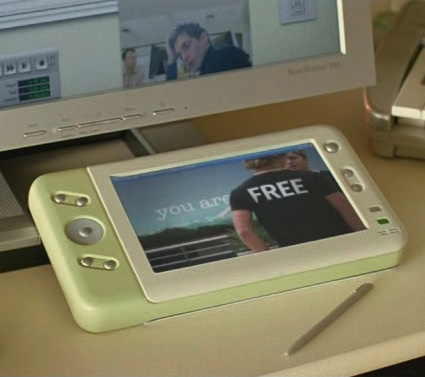
Microsoft Origami Project


Microsoft's top secret device to take on the Ipod and perhaps a host of other machines. Not much is known about the device, but it certainly looks interesting. I had a copy of the "unreleased" commercial floating around, which certainly looks very authentic. However I cannot share what the memory, cpu or other information will be on the device. It certainly looks interesting,
although a little on the large side.


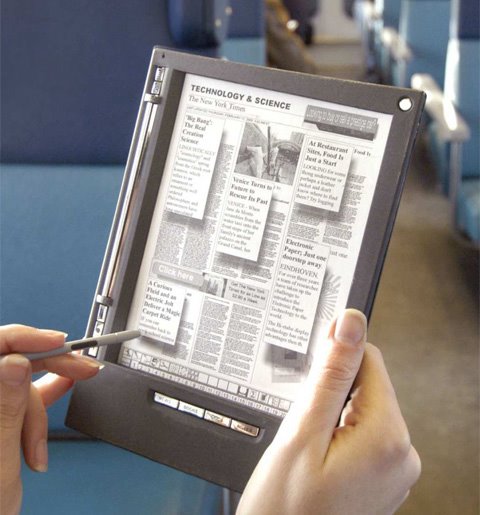
Irex Iliad e-Reader.

This is a very pretty device with a very natural easy reading screen. Specs are an 8.1 inch screen with 1024x768 (160dpi), 400mhz Xscale processor (fast), 64MB ram and 224mb Rom. There is also what appears to be a nice interface match up, giving you several different ways to communicate -- CF, 802.11G WIFI, 10/100 Ethernet, SD/MMC and USB). This is a thing of beauty, although I am uncertain what the battery life will be and whether the size of the device would preclude me from making this a useful device on a daily basis. Certainly reading articles from an electronic device is a lot more interesting than the paper journals.


I think that we are in for a very innovative summer. I am very excited about these new products. Naturally, the handheld king, Palm will have to come up with something extraordinary to compete with these, but I think that they are more than capable of pulling another PALM TUNGSTEN innovation out of the hat and out of the blue. By the way, am I the only one noticing that the Unicom device looks a lot like a Lifedrive?

LDD.

Microsoft Origami Video Looks Interesting.

Microsoft has been rather quiet about this device. It looks very interesting. If it has a very good input system I think it would be worthy of a good look. First thoughts are that it is a little bigger than I would like, but the video is very impressive and I would love to know if Bluetooth is the method of transferring the photos from the telephone to the device. Origamedoc.com???

A Link to the website is listed below or as usual just click the title of the story:

http://youtube.com/watch?v=JqVszfrB_VI

Friday, February 24, 2006

NEWS: University of Virginia School of Medicine offers PDA Requirements

The University of Virginia School of Medicine offered a PDA guide to its medical students. A very interesting part of the recommendations was found near the end with their thoughts on other Palm Devices:

"The Lifedrive has a lot of reported bugs and is large and expensive."

How's that for objective?

While I agree that the Lifedrive is buggy, there are some things that decrease the "bugginess" of the device.

First of all, the software that is being downloaded should be in physical ram and not running from the disc drive. That gives you essentially 32mb of "real" memory to work with before you drift into the neverlands of the additional 32mb of virtual ram afforded by the disc and which imparts the ubiquitous slowdown seen by all devices eventually.

However where I find the Lifedrive to be superior is in the memory of the Lifedrive itself. Although buggy, if you use the drive and an accessory SD card, you will find that the storage is superior to almost any device out there. Additionally, running programs from an SD-ULTRA card is almost akin to running it from the native 32mb memory. That is to say, it is like having 1 gigabyte of ram to play with.

Nevertheless, kudos to UV for at least having the courage to actually provide Palm Pilots (I noticed the Windows CE and Mobile systems were not on the requirements list). They even provide a subsidy for the "required" device.

A further foot note to those in the Windows camp......, well perhaps, it would be better to let the UV-ites tell it themselves:

"How about Pocket PCs?

In the fall of 2005 we purchased and evaluated side by side the current models from Palm and Dell. (Dell is seen as offering the best Pocket PCs at the moment.) The features and functions are almost identical on the two platforms, as Microsoft and Palm have copied each other's successes. But we found several shortcomings in the Pocket PC:
They are generally more expensive for the same features compared to Palms.
The battery life is shorter.
They require rebooting more frequently than Palms.
They are larger than equivalent Palms.
They don't work well with Macintosh computers.
While the Pocket PC platform is getting closer in parity to Palms than they were in the past, there was no advantage that we could find in buying a Pocket PC, especially given the higher cost. As a result, we no longer recommend the purchase of Pocket PCs for medical students. If you have a Pocket PC, staff members may not be able to assist you in installing or troubleshooting applications
."

I cannot believe the openness that this recommendation implies. It is refreshingly bold. The U pulls absolutely no punches in its recommendations and pans. We will be keeping a lookout for more open discussions such as this one.

Feel free to click on the title to take you to the University of Virginia's website.


LDD.

Small Pause.....

To those of you who have written to me asking about the apps for Mobisystems, HandBase and my all-time favorite, Smartlistogo, please be patient. I have been looking for a good place to host the files. Free is always preferrable, but we did look into a paid hosting service to increase file accuracy.

There is a test site that is not currently online but still in beta testing. Additionally, I will probably begin writing my own apps - as I have done - and getting others to add to the growing list, as I hope. Another possibility is to ask the program developers, Mobi/Hand/Dataviz to host the files and just point a link to them. I am particularly interested in seeing the number of downloads per application and I think that they may be better suited to do this.

As of today, I am looking at Google's new offering due to the fact that they are offering 100mb of free space. This is much greater than a few of the paid sites that I have been looking at. If Google allows HTTP or FTP downloading and file hosting, then I think that I will have no choice but to migrate there and save a few pennies in between.

Since the files will be predominantly free, I think that advertising from the page may pay whatever other bills may be accrued.

If anyone has any other ideas on this matter, please feel free to drop me a line.

Thanks.

LDD.

Saturday, February 18, 2006

Schematics for ALP (Access Linux for Palm) Shown at Linuxdevices.com and a Question


Linuxdevices.com was gracious enough to publish the schematics of the newly announced ALP (codename for future software ?Palm 7.0). Very very interesting schematics.

Palm OS will remain as an emulation model, but the exciting thing is that Java will be built into the SYSTEM, thus allowing for 3rd party "native apps." Can you imagine replacing these apps from the applications module and using the User Space for other things?

The kernel looks solid - that is as solid as a schematic diagram can confess - and it would appear that they are taking into account a lot of 3rd party applications. Are you drooling yet?

However there are a few questions; one of which is very important:

Will ALP (Access Linux for Palm) serve as the new operating system for all Palm Devices or will it only serve the telephony market, such as the Treo line? (See the right lower side of the diagram where it mentions "GSM/GPRS/EDGE/UMTS, Wifi, Bluetooth etc."

If it is only for mobile telephony, does that mean that we will have to put up with the experimental COBALT on the other devices?

Conversely and obviously more exciting is the true question:

Will all future products feature telephony and possibly VOIP and will older devices be upgradeable?

A whole weekend to ponder the news from Barcelona.


LDD.

ALP or GULP? A New Operating System Finally !!!!!

It won't come until next year, but Access annonounced this week that they are releasing SDK's for a new operating system based upon the Linux Operating System.

Only two words to respond to this one: ABOUT TIME !

This should be welcome news for high end Palm users. The idea is that the new system will have a smaller footprint than the current one, but upon reading a few specs this week, I am begining to wonder if this may be the case.

That the PalmOS portion of palm, which does not exist anymore since the purchase by Access, is changing to Linux, seems to bear a very interesting resemblance to Apple and its OS X ventures. Apple was very successful at this and since late last year I have begun to notice that Palm is going in the same direction. Similarities are getting more and more interesting. The Palm stock is going up - probably secondary to the Treo for the most part and the declaration of a stock split - symbolizing a bullish sentiment from the company itselfp; the announcement of new products to come and now the move to a new operating system that could put an end to the speculation of "when will Palm OS 5 come to an end?"

The worry about Palm is legitimate, leading to even one of the biggest shareholders of Palm to state that the company should sell itself (or seek strategic alternatives). My suggestion to him is to sell his Palm stock and join Carl Icahn over at Time Warner and raise a ruckus over there!

Palm is moving in the right direction FINALLY. Linux is the way to go! It is something that should have been done a long time ago instead of attempting to pull a Microsoft job of draining every last cent out of the OS 5 operating system (ie. Windows ME ). The present OS is not capable of dealing with the demands of the new hardware. Almost everyone wants true multitasking ability, something that the present OS does not offer. NVFS (the file system used by the new Palms - Lifedrive, Tungsten X, Treo 650) is a fantastic advancement for Palm. The nonvolatile nature ensures that your data remains intact even if the battery is cleared. However NVFS works with FAT-32, the disk system that runs on our PC's. The problem is that although this is fantastic for people like myself because I do not have to hotsync since I do not load a lot of new files, but spend most of my time backing up data files the ability to do this via my SD card is great. However the 3.6 g Lifedrive is not as nice. After using the filesystem to load files directly to the Lifedrive, it does not run programs directly without crashing routinely and becomes more unstable when it is used for anything other than media file storage.

This is where Linux will be a welcome alternative. Linux was made for multitasking. It is in every flavor - SUSE, REDHAT, etc. Additionally, the Linux filesystem is ENVIABLE. It is one of the most stable and with Open Source software it is constantly kept up to date. It has fantastic fileserving ability and ....did I say STABLE ! I have used it and it is fantastic.

Access plans to use a Browser type system for the GUI, something that may be akin to the Explorer motif used in Windows. However the beauty may be a little dampened by the fact that the current PALM OS programs "appropriately written" will run on an emulator atop the linux backdrop. The current Apple move to Intel is showing a little strain with this strategy, since they are using an emulator to convert their Motorola driven programs to Intel. This is an extra step that slows everything down. In terms of the Lifedrive this could become unbearable with its already slow disc access. With Linux it is my hope that even with the 4g Lifedrive, there will be a way to keep the entire operating system in memory and all vital files in memory without having to access the hard drive, thus ending the delay. Additionally, it is my hope that the Lifedrive will stop crashing with an operating system designed for both multitasking and file access -- which could mean running files from the Lifedrive itself and maintaining stability.

With Linux's incredible Open Source community, I believe that we could see the emergence of some of the GREATEST software products to ever come out of the Palm community. Graphic intensive GUI's and apps never before imagined. The ability to print directly without having to purchase separate printing programs, ie. built into the system; wifi, bluetooth and VOIP. Not to mention Google/Google Maps etc. The world of Java is finally here with this operating system. IBM's JavaMobile is a fantastic piece of software that really takes into account the handheld environment. It is prominently featured in the Access Linux package.

In short, the time has come for Palm to move on to the next level and I believe that Linux is the answer. There will be problems at first, there always is, but Access appears to be moving in the right direction to preserve the Palm OS (Incidental note is made of the fact that there are Windows emulators running on Linux already present on the PC. It would only lead to expectation that this could be done for Windows CE and Windows Mobile. In other words, you could possibly run two operating systems on your Palm in the future - just a thought ) !


http://www.infoworld.com/article/06/02/14/75368_HNaccesspalm_1.html

http://www.engadget.com/2006/02/14/palm-os-5-rip-access-linux-platform-alp-hello-beautiful/

http://www.palmsource.com/press/2006/021406_accesslinuxplatform.html

http://www.tmcnet.com/usubmit/2006/02/14/1374521.htm

http://www.palminfocenter.com/view_story.asp?ID=8388

http://www.linuxdevices.com/news/NS4663700447.html


More to come.

LDD.

Monday, February 13, 2006

Palm finally getting the point !


I think that Palm is finally begining to get their act together, recognizing where their greatest level of support is coming from. Today, Palm announced that they will be joining with Microsoft to deliver health care solutions to the PALM 700W.

Although this says little for the Palm Operating system in the statement, a trip to the Palm Healthcare Solutions page tells a different story. A large listing of top notch software for the Palm Operating System with very nice links. Additionally, there are timely articles on the subject at hand, including electronic prescribing and special registration areas for special offers and events.

Yes, I finally think that Palm is begining to understand that the medical community has stuck with them through thick and thin and we are all looking forward to the emergence of great products.

An incidental note is made today that the company offered a 2:1 stock split with the price of the stock at around 36/share. A very bold move indeed and one that suggests that this company expects great things over the next 2-3 years.

http://www.palm.com/us/solutions/healthcare/ Or click on the title.

LDD.

Sunday, January 29, 2006

Mike Mace Speaks.

Again, if you get a chance, head to Mr. Michael Mace's website for an insider's look at the Lifedrive. Below is Mr. Mace's response to my comment on his story.


Michael Mace said...
Hi, LDD! You're the sort of user I had in mind for an archive device. I agree with you that solid state storage would be better than a hard drive, assuming the price is equivalent.


Thanks Mike and I am adding your site to my sites list on the left. Certainly you are one of the most influential people that I have come across in the Palm Community. Such honesty is hard to come by these days, but I think that we are on track for something special from Palm.

LDD.

Michael Mace Great Article on the Lifedrive

If you get a chance, please see the blog of Mr. Michael Mace, "former Chief Competitive Officer and VP of Product Planning at Palm, VP of Strategic Marketing at PalmSource" at mobileopportunity.blogspot.com.

Mr. Mace provides a view that is really unique about the shortcomings of the Lifedrive Mobile Manager. I think that Palm will readily acknowledge some of the shortcomings that Mr. Mace is not afraid to describe.

I am very confident that Palm will come out with a Lifedrive 2 that far exceeds our expectations for stability and efficiency. I think that CEO Ed Colligan is actually listening to and reading the criticism about the device.

From almost all corners of the world in regards to both top devices, we are hearing about the need to have more on board memory - 128 to 256 megs minimum for Lifedrives and Treos. In order to run older programs that require continuous memory, you need to have at least this amount of memory on board. Hopefully we will see this come to fruition.

I did leave some feedback on Mr. Mace's site because I think that there were a few things missing from his post in regards to the lack of robust sales of the device. Hard Resets and sluggish response times were not initially mentioned and I feel that these issues kept a lot of physicians from buying the device.

But as one who loves the Palm Operating system I reiterate my confidence that the Lifedrive 2 will be a great device. They have had more time for testing and the support from even ex-employees such as Mr. Mace, combined with a CEO who appears to be listening, all bode well for the future.

LDD.

Sunday, January 15, 2006

Thoughts on a New Lifedrive


February 16 and/or 26th appear to be coming from a few sources of mine in regards to the release of a Lifedrive 2. I am certainly hoping from a software standpoint that Palm offers the following if this is true:


1. A resolution of the memory leak fiasco which has not really been resolved with the update. I have called upon many friends in the field who have done the update and they are still experiencing soft resets at inapropriate times.

Speaking to a few software developers, some are perplexed by the fact that the program portions are in the same areas as the hard drive. They are suggesting that Palm should have and possibly should just come out with a solid state 128 to 256 mb Rom/Ram and then have the hard drive portion - 4-8 gigs - act as a repository and storage. Better yet, turn the whole thing into a solid state solution with NVFS and I think that this would solve the entire problem.

(If I recall, the Zaurus has a 4g hard drive and they do not seem to have this problem. I bring this up since the Zaurus runs on the same platform as the Lifedrive).

2. If they went to an all solid state solution, the size and weight would be decreased substantially. The only thing left to work on would tbe the aesthetics. Right now, it's a bit of a gladiator.

3. Right out of the box video and audio compatibility without the use of 3rd party apps. With the advent of the ipod and with the new offerings from Creative Labs and Samsung (See CES reviews on the various other blogs out there), this is a must for Palm to survive in this space.

4. Better wifi compatibility and a complete tweak of the underlying web browser. It is still buggy and does not use memory in an efficient manner. It is a major source for memory leaks.

5. Perhaps not for the LIfedrive 2, but the handwriting recognition aspect of this machine has really got to improve. Microsoft's Windows Mobile actually has better recognition with its block graffiti function, which is basically Graffiti 1. But above this, Nokia continues to lead the way with its Symbian operating system. They have developed an incredible piece of software for one handed use. It is something that developers will need to look into for the future.


So, armed with what I have been told by a few friends, I have taken the liberty of not loading the harddrive component with software and leaving it for storage. Using instead a 1 gigbyte SD card to run any additional software that I may have or need.

I have not had a crash in over 2 months. The hard drive has remained barren for much of December, but I recently added some A/V files and will consider adding software, but only for storage.

Hopefully this will be stable. I will embark upon the update very soon. But for now, as the old saying goes, if it works for now, don't make chanbes.

(A few pointers to a new Lifedrive being released or the former being phased out:


1. There are no more eCoupons available and the last ones run out on 2/15/2006.
2. Palm reduces the price of the Lifedrive by 10%.
3. There is increasing chatter by a few very reliable sources.
4. Two local stores have stated that they will NOT be getting a new shipment in.

The last one is the most important! It has, with about 95% sensitivity and 80% specificity signalled a paradigm shift. But we will have to wait and see.

Will I get one if it's released? Well, I wouldn't be able to keep this site going if I didn't :).


=====

Addendum:

The new website for software development is still a work in progress. I have not put it up for beta release yet, but I am getting very close. The domain name LIFEDRIVEDOC.COM has been secured and you will be directed to this site if you place this in your browser.

It is the begining of much more to come.

LDD.

Thursday, January 12, 2006

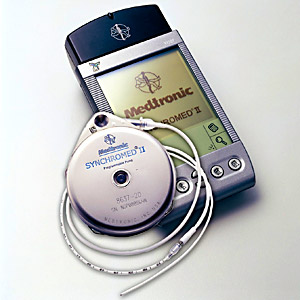
Medtronic Uses Revamped Palm for Intrathecal Delivery Device


Not exactly Lifedrive related, but apparently Medtronic has found a way to use a Palm Device to electronically control an intrathecal delivery device. They, along with other companies such as Advanced Neuromodulations Systems - a company presently working on pacemaker technology using handheld devices - appear to be at the forefront of what could be a new dimension for handheld gadgets.

No longer are PDA's limited to just PIM functioning, telling the date, showing addresses and appointment times, but they could become a literal lifesaving force for many patients.

What makes the Medtronics' Personal Therapy Manager (PTM) interesting is the fact that the company decided to use an old HANDSPRING model revamped to do its work. Medtronic apparently made a deal with Handspring to remodel the device, after realizing "that Palm interfaces were friendly and popular."

If Medtronic can do this with a simple first or second generation handheld with limited memory and functionality, imagine what they could do with a Lifedrive.

However, according to Reena Jana who broke the story in Business Week, the Medtronic device is so customized that its PIM functionality no longer exists. I

Additionally, the handheld device appears to cost about $2,000 in addition to the $20,000 for the implant. I think that many of us out there in Palm Land would never have believed that a Handspring would sell for $2,000. But honestly, I think that this is the begining of something wonderful to come. Bravo Medtronic for taking the leap.


1
Jana, Reena. Medtronic Automates Pain Relief, Businessweek Online, January 12, 2006.

2
Photos used with permission by Medtronic.


LDD.

Sunday, January 08, 2006

Palm Addicts Reports Possible New Lifedrive In February

A rumor from Slovenia from Sammy McCloughlin's great site Palmaddict's has suggested that a new Palm Lifedrive may be released soon, sometime in february. Although rumors tend to take on a life of their own, particularly this one since the release dates for most palms is from April to June, Sammy has seen fit to publish this, meaning that it has a very high probability of being true.

The link to Sammy's short note is listed below or click on the title.

http://palmaddict.typepad.com/palmaddicts/2006/01/new_lifedrive_c.html

Tuesday, December 27, 2005

Cochrane on Skyscape? Pricepoint inflection points.


Skyscape announced today that they will be offering the coveted Cochrane list for Palm and other devices.

The Cohrane reviews are essentially the Gold Standard in medicine following the introduction of evidence based medicine. In short, this mantra, which is just loved by insurance companies, allows health providers to justify their treatment options. Critics argue that the "art" of medicine is lost with all of this evidence based criteria since most of the decisions fall on a bell curve. If you happen to be one of those patients who do not conform to the treatment options seen by the 95% of the population then there's a problem.

But with personal thoughts aside, the reviews are now available for (probably) physicians to go through at the point of care, which as discussed below, is the most fitting way to do things.

However, having not tried the program I am already seeing several issues:

1. First the price point. $29.95 for each set. Sets can include 3 for anesthesia, 4 for psychiatry, 12 for infectious disease and 7 for neurology. $30 per set seems somewhat steep, given the fact that much of the Cochrane review can be viewed via the computer for much much less than this.

2. Past experiences with Skyscape. Now I will have to be careful how I put this, not wanting to set up the you-know-who's who cannot wait to get their hands on a class action, but Skyscape has had some issues in the Palm Community with software that tended to take over your Palm device, leave stray files upon deletion and have a series of crashes. Additionally, their customer service has not been the best. There is no information about how their software runs on Lifedrives.

If I were in charge of the Cochrane series, I would have chosen iSilo to conduct the search. Most of us in the medical profession can attest that this is really the gold standard for non-standalone documents. They have really done a lot for the medical profession when it comes to standardizing output and making navigation a breeze. If you ever get the opportunity, take a look at DermMeister, a brilliant Dermatology document that is easy to navigate.

Additionally, iSilo and its accompanying documents can run from the SD card. So you don't have to use space on your Palm device.

However, I am willing to let past experiences reside and see -- given the pricing, which I think is somewhat unreasonable -- how well this does. I will also look to see if there are any comments, both good and bad from colleagues who use it.

LDD.

Wednesday, December 14, 2005

Epocrates To Make Medicare Part D Available


In what has to be the best news to date to sprout from the Medicare Part D department, Epocrates will attempt to alleviate the fears of many physicians and supply the formulary on their now ubiquitous program.

Many of us have grown increasingly confused and somewhat shell-shocked by the new Medicare provision, which appears to have no linearity in its implementation. Patients over 65 are confused and cannot tell if it would be more profitable for them to give up their present prescription coverage which is secondary to Medicare - which until now offered no prescription drug coverage and only covered medical visits.

The confusion is made worse by the fact that few people know what medications are covered by the formulary (The formulary is the name given to the list of drugs supplied by the particular insurance company in question -- in this case, Medicare).

Epocrates has come to the plate and offered support for this endeavor. It is great news for many of us wondering about covered medications for our patients. Epocrates will provide this in the usual manner, by listing it as it does other insurance companies. So we will be able to have a dropdown menu that includes Medicare Part D. This is true point of care implementation. In my view, the best way to do this sort of thing.

To read the article, just press on the title and it will take you to the Epocrates news room.

LDD.

Saturday, December 03, 2005

Are issues Resolved with Update 2.0?


Click on the title to see. Brighthand has a very comprehensive forum detailing the recent update experiences.

Many are stating that it is just best to erase a lot of the software and backup your data before attempting the update. Additionally, the time for the update is over 30 minutes at least, more if you delete applications and reinstated them one by one.

However, the most concerning part of the update is the file stability issue. It does not appear that this has been completely resolved with some members complaining of crashes with Solitaire - A non-third party application.

I am still waiting for the reviews before updating. So far, all of my important data is installed on my original TUNGSTEN T (Still one of the best pieces of hardware ever made - petite, powerful and attractive). so I have the time to wait.

(Picture Courtesy of www.brighthand.com)

Friday, December 02, 2005

LIFEDRIVE UPDATE 2.0 HAS ARRIVED !!

It is finally here. I have not had the opportunity to use this as of yet, but all I can say is "THANK YOU." Click on the Title to take you to the Palm Website

I will try the update out this weekend and confer to everyone what I think about it.


=== The following information is from the Palm site:


What is the LifeDrive Update 2.0?
Here at Palm we want to make sure you get the best experience possible with your LifeDrive mobile manager. To help make that happen we have released a new update to the LifeDrive mobile manager.

This software update (version 2.0) provides a variety of enhancements for:

Wi-Fi coverage in low signal areas
Roaming performance
File system stability
Sound quality when listening to MP3 files
More flexible multimedia functionality, including file transmission over wireless connections, file saving, and faster recording and playback
Browser performance, including more efficient, faster page rendering
The VersaMail® application to version 3.1C for large document attachments
The Docs To Go application version 7.006
New hard reset option to erase Program Memory but not Internal Drive contents more info
Also included from the LifeDrive Update 1.0
(previously released June 2005)

Fixes intermittent connectivity issues with these Wi-Fi routers:
Linksys WRT54G Wireless-G Broadband Router
Belkin High-Speed Mode Wireless G Router


What to expect

The LifeDrive Update 2.0 will change the permanent (ROM) software in your mobile manager. Please set aside at least 20 minutes to complete the update process.


Caution: This update will erase all data in Program Memory. Read the instructions in the installer carefully; they will guide you through backing up and restoring your personal data.
After the update, you'll restore your data from these backups. However, some third-party applications change the way your device backs up data. Other third-party applications do not back up data. If you have third-party software on your device, please contact the developer to learn what components are backed up during a HotSync operation, and if HotSync conduits are altered. Any data not backed up will be lost.

This update does not erase the contents of your Internal Drive (pictures, music and documents) or an inserted expansion card.

====


LDD