Welcome

Lifedrivedoc.com began as a place to talk about the Lifedrive. It soon became apparent that it was much more than that. Since moving on from my Lifedrive, I am engaged in more avenues of technology. That technology has intersected with my professional life - Medicine as well as my social life.

As noted above, the blog is about a lot of things in relation to technology. If you are looking for Lifedrive related material, I am currently dividing the blog so that those searches will be easy for you to find. Most of them will be pre 2007, that should help. Additionally, if you are looking for the links that used to be on the left border. They will be back up in a different format soon. I do enjoy reading about new things to do with the Lifedrive, so you can feel free to let me know about those. I will also post those on the site.

If you are having trouble getting an RSS Feed, click on the feed link below or type this into your reader: http://feeds.feedburner.com/lifedrivedoccom


Enjoy.
Showing posts with label Lifedrive Essentials. Show all posts

Wednesday, January 19, 2011

Getting Lifedrive Parts.....


I was tinkering the other day with an old Lifedrive and wondered where I could buy a new battery.  I stumbled upon a wonderful site that has used parts, but that are still functional.   So for those of you who are hungry for a bit of nostalgia and if you think that you are relatively risk averse, you should pay a visit to Used Pda Parts:

http://usedpdaparts.com/Lifedrive.html


LDD.

Credits:  Picture of Lifedrive Motherboard. 

Friday, June 25, 2010

Nalder's Lifedrive mLearning video...Neat.

Jonathan Nalder has made an interesting podcast entitled "Lifedrive mLearning."  It is an overview of the Lifedrive and I think it looks very interesting.  As explained on the website http://voicerecorderz.com/   "An www.mLearnxyz.net video overview of the Palm Lifedrive from an educational perspective."

Very nicely done.


LDD.
(Click on title to take you there).

Friday, April 18, 2008

Lifedrive Essentials: BILITOOL (For Medical Professionals)

Have you ever been enamored by a piece of software that you just had to take a pause, inhale slowly and say "wow!?" Well I did just that this last weekend. One of our beloved nurses on the floor, decided that she had had enough of the waffling that most physicians do when they get a bilirubin level on a newborn. She had been made aware, by the Residents-in-Training of a new online tool called BILITOOL.ORG. This online program allows you to put in the date and time of birth of a baby and the hour at which the blood was drawn (if you know the age of the baby already, it has the ability to accept that as well). It will then take all of the data from the now relished and quoted BHUTANI GRAPH and display not only the risk category that your baby is in, but offer suggestions about when to place the baby on phototherapy.

I keep a copy of the BHUTANI GRAPH in my pocket at all times. I made a copy of it when the paper first came out and decreased its size, laminating it and saving it in my wallet. I do the same thing for the immunization schedules. My decision making is always done on a patient by patient basis mainly taken from BHUTANI's paper (Bhutani VK, Johnson L, Sivieri EM. Predictive ability of a predischarge hour-specific serum bilirubin for subsequent significant hyperbilirubinemia in healthy term and near-term newborns. Pediatrics . 1999;103:6-14).

So, if I have a baby who is term and has a lot of bruising or a cephalohematoma, I know very well that within the first 24 hours, that baby is going to have a high bilirubin level. Whether it is high enough to start phototherapy has always been the issue. Many of us will not do this unless the numbers approach 18; then there are some who will wait for 20; or 14 (all numbers at 48 hours). However, for myself, if the index of suspicion is high ie. ABO incompatibility, uncertain dates, prolific jaundice after 12 hours, a mother with beta strep, I am inclined to start phototherpy a lot earlier than the allotted 24 hours. In fact, I am inclined to order a bili at 12 hours based on my index of suspicion and the aforementioned issues (obvious jaundice and decreased responsiveness) and on the AAP guidelines. But not everyone will do this. As clinicians, we still have that index of suspicion and clinical awareness and independence.

So where is the line drawn? For our seasoned nurse, it became a never ending battle among physicians. One would start phototherapy, one would not. Same scenario, different treatment plans. And none of the plans were wrong, usually leading to the same outcome --> Healthy baby.

Naturally, I was skeptical about BILITOOL at first, until I found that it conformed to the BHUTANI graph completely. I was particularly fascinated by the fact that the program took into account the various factors that accompanied the baby. All of the ones listed above are incorporated into the decision making model. A link to the Pediatrics listing for risk factors is a plus. The decision to start phototherapy is outlined in a nice table. See the diagram below:


Palm Software

What is an added plus for this program is the fact that the program, in addition to being online, is also available as a standalone download for all Palm devices. And does it work brilliantly? It is probably even better on the Palm than online. You are again greeted with two different ways to enter data, either by length of time or by date and time of birth:


Once the data is entered, you press (Calculate Risk Zone) and voila, you are greeted with the essential information taken from the BHUTANI GRAPH:


The beauty of this is that not only is there risk stratification, there is also a guideline as to whether to start Phototherapy or not:


Risk stratification is further defined by pressing one of the icons, where you are led to definitions of high, medium and low risk:


In the event that you have a baby "who is on the fence," you are also given the neurotoxicity risk factors to consider. As the adage goes, "Cure the problem and you'll cure the disease." So correcting the acidosis or the sepsis will enhance the correction of the bilirubinemia. This is priceless, particularly if you are not thinking about G6PD deficiency or hypoalbuminemia:


And finally, threshold guidelines are given for the baby, with age and other considerations given. This is really priceless:


Again, these numbers correspond not only to the BHUTANI GRAPH and paper, but also to the American Academy of Pediatrics (AAP) guidelines on the treatment of hyperbilirubinemia, with risk factors. This is really an impressive piece of work.

The authors are also impressive. Drs. Tony Burgos and Chris Longhurst are both Assistant Professors at Stanford University School of Medicine. Dr. Burgos is the Medical Director at Stanford's Lucille Packard Children's Hospital, while Dr. Longhurst is Physician lead and director of Informatics. Dr. Stuart Turner is at the Health Informatics Graduate Program at U.C. Davis.

This is an impressive lead of physicians heading this program. The software is free and appears to be a part of the Creative Commons license. Unbelievable, for the amount of work that must have gone into this piece of software, both on the online side and on the Palm side. I commend Drs. Burgos, Longhurst and Turner for creating this incredible tool. It is one of the best that I have seen in a long time.

If you deal with newborn babies, this piece of software is a must-have in your collection. I am still looking for flaws after a week of dealing with 3 hyperbili babies and I have yet to find one. The papers used for reference are of the finest caliber that can be found on the subject. They are peer reviewed and in the authoratitive journal on Pediatrics in America. Again, I highly recommend that you go to www.bilitool.org, you will not be disappointed.


LDD.

Saturday, March 22, 2008

SDHC Lifedrive Upgrade to 32 gigs? Dmitry Grinberg says YES WE CAN.


Today, I read an article by long time Microsoft supporter David Dejean, in Computerworld. He discusses the work of Dmitry Grinberg, a software developer who has offered to write a driver to enable the SD card reader in the Lifedrive to accept the 8 to 32 gb SDHC cards.

Dmitry has a website named Palmpowerups.com . You may remember Dmitry put out an overclocking program to accelerate the Lifedrive. It was able to also decrease (underclock) the lifedrive for greater stability. He is quite a capable programmer and I think that he will come through in June or July with this.

If you get a chance, drop over to Dmitry's site, but more importantly, head on over to David Dejean's site. Wow, news continues for the Lifedrive...


LDD.

Tuesday, December 18, 2007

Lifedrive II: Oh What might have been!

I had the opportunity to peruse a few web sites looking for Lifedrive information and ran into PDA24/7. They held a competition a while ago, requesting input as to what the Lifedrive II would look like. The winning entry is remarkable.

Shaun McGill who runs the site has been a fantastic contributor to the Palm lifestyle and really ran a fantastic contest. The winner Peenut really captured the imagination of many of us. This would have been a great device. Who knows, perhaps with Linux, we may still see it come to fruition.

Pop over to Shaun's 24/7 site, you will not be disappointed. Meanwhile salivate at what might have been:


Image from www.clieuk.co.uk/forum and PDA 24/7.

Click on title to take you to the original page and to view much higher resolution pictures of this masterpiece. Remember, these are renditions and not real, as far as we know.

LDD.

Friday, July 06, 2007

Updating and trying new software and celebrating Timothy Allen.

Over the next few weeks, I will be updating my software catalog. I am salivating at the prospect of using a fully functional Native PDF program. I am going to try Dataviz's Documents (DTG) v. 10. I am still using version 7 at the moment. Or I should say that I have it stored on my Lifedrive, because I really don't use it at all, in favor of Mobisystems OfficeSuite, which I still believe is one of the best suites ever written for the Palm Operating System. So why change? Well, I could never really delete Dataviz's DTG without causing significant instability on the Lifedrive. Despite my complete hatred of the program (v 7.0), I always had to leave it on the device, taking up valuable memory.

I was unimpressed by Mobisystems' last offering of OfficeSuite. Not much had changed from the previous version and worse, they left the native PDF app to an outside company, Metaviewsoft. The product was buggy and never failed in causing a soft reset on the Lifedrive. Not to mention the product was originally a beta product to begin with. I really began to lose my admiration for Mobisystems after that, so I did not upgrade. But because of my dire need for native PDF files, I am going to give Dataviz another try. I have not read any reviews on the product from Lifedrive owners. And since Palm will not be releasing a solo handheld machine, ie. Lifedrive 2, I will have to make do with this one for now and see if it will not be temperamental with the upgrade.

As I write this, I am tempted to also update Mobisystems OfficeSuite. The usual upgrade cycle for this product is in July and I popped over to see that they are now releasing an upgrade to OfficeSuite for $9.00 which will include native Powerpoint presentations. They have also improved the GUI of the Excel program. It looks quite pretty. So, over the next few weeks, I may try both products out. By the way, I also noticed only a small mention of the PDF program, which is still being run by Metaviewsoft. de. It is a far cry from last years rave about the product. Anyway, I will see what Dataviz has to offer and see if they have finally solved the PDF dilemma on the PalmOS.

Additionally, it has been a long time since I have seen an update to HandBase. A lot has changed since version 3.00 and I am looking forward to using this product again. I am steering towards this product for the encryption capabilities. Additionally, they have some nice Form features that are lagging in Smartlistogo. I still have a few Handbase files that I use religiously, but I have not really tapped into the encryption capabilities and the forms. I am still in love with Smartlistogo. I love the desktop application and the simplicity in writing database apps. However, Handbase seems to offer a lot more, including the ability to write an app and run it natively from the launcher. Mobisystems Database has similar functionality, but it is not as useful. However, I still find a few cumbersome minutiae in Handbase that originally compelled me to go somewhere else. The nickle and diming of features is still going on. If you want to do custom wireless printing, you have to buy another applet for 19.99. If you want to do ODBC, you have to buy it - 99.00 for the Enterprise edition. Plugins ie. Treo camera plugin 9.99.

However, it is becoming clear that Handbase continues to be the Medical Standard for databases. Hence, I will be going back to it for a little while, porting all of my apps written in Smartlist and placing them in Handbase. I will (eventually) put them on the web site. I've "beta tested" the smartlist apps for over 3 years, so I know that they work. So I will eventually share them.

Additionally, per my last article, the need for portability is high. Both Smartlist and Handbase have data that is portable to a WindowsMobile or Symbian device or translated into Access data, should the need ever arise. Yes, after 10 years of being with Palm, it saddens me to say that this is something that I have to even think about. It's just not right, but success in anything is based upon having a Plan B. Stay tuned......


LDD.


Addendum:

And finally, on another note, I want to go out on a limb and put to the test a few old programs from a time gone by. In particular, I would like to highlight one developer who has offered free software since 2003 on Palmgear. His name is Timothy Allen. He has a few wonderful OB programs out there but I have not placed them on my Lifedrive, due to the NVFS platform. However, I will be trying out some of his programs in the next few weeks. Several updates have been made recently and I think that this should provide some stability to the device. If you're interested in seeing Tim's work then go to PalmGear.Com or go here .

You can also directly access Tim's website at http://www.fppda.com/ This is really quite good and you won't be disappointed.


LDD.

Monday, July 02, 2007

Thoughts on Legacy Programs

Tonight we are learning of a further delay in the Palm survival machine. There are many out there acting like vultures as Palm circumvents shutting down. News reports opine on the injection of millions of dollars from an outside company, mainly to thwart a takeover of the company. Surprisingly, much of this is to be used to fund a special dividend. I guess I am in healthcare for a reason! I totally do not understand why any company that is having problems, would use VC money to fund stockholders or to just give a white knight more shares. Somehow, I imagined that this money could be used for R&D. But again, that's why I do what I do and the guys in suits do what they do.

So, while all of this is going on around us, I am left to think about the obvious. Whether or not Palm is acquired, becomes bankrupt and disappears, continues on this lukewarm pattern or excels beyond everyone's wildest dreams, there is something that will definitely happen within the next 24 months: We will have a new operating system!

Given this fact, it becomes a daunting task to imagine what will happen to mission critical software that presides on the Palm device. I ran an inventory check this weekend on just such a scenario and concluded that I was in good shape for any revision. I calculated that I had only 25% of my programs containing mission critical or non-mission critical data in formats that were unrecognizable by any other software out on the market now (...and yes, I had to include Microsoft's Windows CE/Mobile, just in case....).

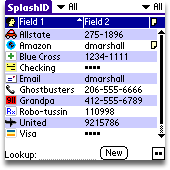
However, one of the programs, SplashID is one that will need to have me purchasing the desktop version, just in case there is no operating system to use it on with the Palm. Naturally, a company such as SplashData is conscientious about its customers and I believe that it would only be a short period of time before they came out with a solution to this scenario.

Other programs, including several pregnancy programs, would require me to obtain other alternatives. However, most of my data is included in programs that already have SQL type properties and their data is easily converted into .csv or .txt files for entry into Excel or Access or Filemaker (Mac) or other database formats. Thankfully, these are my mission critical apps, where encryption for patient safety and ease of use come together. Without the possibility of portability, I would be in serious trouble.

Programs to seriously think about purchasing if you require Mission Critical databases and small programs are listed below. These programs save data in such a way that it can be ported over to another system, should the need arise:

1. HandBase.
2. Smartlistogo.
3. Database by Mobisystems.
4. Office Suite by Dataviz.
5. Office Suite by Mobisystems.


Software that may be tricky in this department:

1. SplashID. Although there are several ports of this program, I am uncertain whether they are all interchangeable ie. Is the key file useable on Mac, Windows, Palm, WinCE/Mobile?

Software to be really concerned about:

1. Proprietary formats for database files. There are a few pregnancy and inpatient programs that save patient files in a proprietary format. This will not port very well to another system and could become a major issue down the road as Palm upgrades its operating system.

2. Old Software. My old favorite, PregCalc would probably be obsolete. It was written during Palm OS 3.0 and it still works. But any migration to Linux without emulation, would probably see it vanish. Nevertheless, Nagel's rule is so pervasive and mathematical equations don't really change, it would only be a matter of time before the program was recreated. Same holds true for the truly tested MedCalc.


Bottom Line: Look out for Proprietary Formats as Palm begins its upcoming upgrade cycle. If at all possible, when thinking about database files, consider compatibility with Microsoft's Access and Excel standards. That way, no matter what operating system or Office Suite rolls around, you will be ready. Additionally, ensure that any backups of database files that you make, include two additional versions, particularly for spreadsheets ---- .CSV (Comma delimited), .TXT (plain text) and if possible, .XML. The latter provides some nice layout functionality, but is not as critical as the first two.

Additionally, in database files, always look out for relational fields when backing up the files to the above formats (What's that? Well, they are fields that are often calculated fields or fields that will only show up if something else in another field is present). These fields have a tendency of not always showing up when transferred to .csv, .txt and .xml and sometimes will only work if the database or excel file is very similar to the handheld version.

These are strange times and we must be prepared. I think it is only reasonable to think about the best and worse case scenarios. Whether or not this company survives, I have become dependent upon their hardware and software. Should Palm fail in its endeavours, there will be hundreds of thousands of health care workers walking around with Palm OS devices with mission critical data. This data will need to be ported to alternative systems. In addition, all data will need to be recovered, at least for the lagging 12 months. Conversely, should Palm succeed with a new Linux device, the same would hold true for porting the data to the new and improved 'next best thing.'

If you want proof of this, ask me why I'm not buying Apple's latest little machine?


LDD.


*** Addendum:

PalmDoc who runs a really wonderful blog Palmdoc Chronicles (palmdoc.net)
has informed me that Splashdata's SpashID main file is transferable to the Windows CE/Windows Mobile platform. A few others have stated that with the desktop version, this is also transferable to other platforms as well. This is very good to know. I really like this company. At first, I thought their products were a little expensive, but overall, the quality and consistency has been there for all of their products, not to mention support (However, I was at a loss when I did not get a reply in regards to the original question). But we can all rest assured that SplashID is transferable.

Thanks again PalmDoc.

LDD.

Tuesday, March 06, 2007

Lifedrive Essentials: Don't Forget To Download The Palm Update.

Palm has released an update for many Palm devices. The Lifedrive is included. You can download the update from the Palm website or click on the article title to take you there.


LDD.

Wednesday, January 17, 2007

LIFEDRIVE ESSENTIALS: My top 5 Products for the Lifedrive 2006

So, we are in another year and it's a wonderful time to reflect on the past products that have made the Lifedrive an invaluable tool. Yes, it's true, the Lifedrive is an indelible PIA at times, but I have to admit that last year, without it, I would have been lost.

So, at the end of 2006, I decided to list all of the products that I own, including software, hardware, trinkets etc. related to the Lifedrive. They were not all medical components, but among them I decided to choose 5 products, both software and hardware related and rank them in a top 5 . The Criteria that I used included:

1. My Frequency of use.
2. My importance of use? What happened on days when I did not have the product or the Lifedrive with me.
3. Simplicity in use. Anything that is terribly complex cannot be used on a daily basis.
4. DNC (does not crash). This of course is a major point if you own a Lifedrive.

My final rankings are as follows for 2006 and remember, these are very subjective:


5. TCMP.

There was a scream for a tie between this product and Pennovate's Notes, but this one won out . In the end I had to decide which was used more, my Notes program or TCMP. TCMP won out. TCMP is the program that has made it possible for most Lifedrive owners to not give a darn about the slew of video gadgets (except the ipod video) and MP3 players that have been going around (Although NormSoft's Pocket Tunes is also a screamer for this position, given its deep array of settings). The fact that TCMP has been a free "beta" product for years, gives it the degree of popularity that it deserves. Although its founders are now going on to making a commercial product -The CorePlayer- it has been TCMP that has caught the imagination of just about every Palm device owner.

In August, I purchased one of the first 4 gigabyte SD cards to play movies for my kids and myself while on vacation. During a long drive I was able to view a full 2 hour documentary and a 2 hour movie in addition to a medical lecture that I had postponed watching (Alright, I know I was on vacation, but what else is a geek to do when everyone else is sleeping and you don't have to drive)? The playback was perfect and I have to say that I achieved 5 hours of video time before the Lifedrive gave up on me. Not bad!

But it was TCMP that allowed me to do this without a glitch. This little piece of software was the real ipod killer for me. But that lasted until the ipod video came out. That device created a genre of H.264 videos that just about killed TCMP. The quality of the iPod is superior and has made my TCMP driven Lifedrive somewhat jealous. Attempting to watch video podcasts is next to impossible if "created for the iPod." No such problems with the Sony versions of MP4, but again, the iPod ones do look better.

But I digress! TCMP is a worthy candidate and a must have for your Lifedrive. It is the program that creates a "wow" factor when people look over your shoulder at your "serious" PDA. It was TCMP that I used when I had to show the motions of a joint; and again when I attempted to show a surgical procedure to a patient that one of our local physicians did routinely in his office.


4. Smartlisttogo.

If there was ever a database that had to be bought without hesitation, I would choose this as the database. Smartlistogo has been a GodSend to me and has been responsible for me not jumping to the other side (Microsoft) for a long time. Every time I think that I want something with a little more complexity (ie. Mobisystems Database or Handbase), I am driven back to this simple program.

First you are drawn into its lair of simplicity, by making simple tables of names and addressess, effectively recreating your telephone book. For no apparent reason, other than to say that you can do it! Then, you become fascinated to the point of lunacy as you find new ways to do things. You begin to realize that there is an online manual and you start delving into a tricky arena or relational databases, combining data from one database with another. You then spend 4 hours in complete and giddy geek utopia, discovering that you can set alerts that will show up to tell you that something is due. You salivate at the possibilities: Crossreferencing touchdowns with attempted carries; Number of touches to goal ratio of Arsenal's Thierry Henry; Rating interviewees based on hastily created criteria that you have made up 5 minutes before the interview and then sorting them; creating an app of movies to see; Creating an ongoing bank account app. And of course, listing all of the CME and expense lists that you could possibly create. And then you finally get to the big enchilada. The App to beat all Apps in your mind: The Patient Rounding Application to record not only the patients that you have seen, but to capture all charges while at the point of service. You then create imaginative databases of patients and obstetrical due dates and other things.

So, what happens when you do not have all of this information available? You grind everything to a halt and go back to get your machine. Or you have two machines, an old Palm that has a back up of the smartlist app on it. That is how important this program is. It is the life blood of my Practice for patients that I see outside of the clinic. I can never remember them all and it places them in nice areas that I can recall them.

So what is the downside? The downside to this program is that you must backup everything constantly when you have to rely on it so desparately. But more importantly, it is not encrypted. Thus, you can use real names but you must shut down the entire Lifedrive to protect patient privacy. For myself, I carry an SD card that is encrypted and then decrypted when I have to use it in the Lifedrive.

With the advent of the Desktop App, creation is much easier of a more complex application, although it is nice to see that the application will work on either the computer or the Lifedrive regardless of where the program is made. Although Microsoft Access activity could be better, I rarely use Access and prefer to use the bluetooth method by sending the information to the memos program and printing it out or copying it directly via SD or Lifedrive to the computer and printing it out monthly.

This is a Lifesaver. Literally. I keep equations and formulae, associations and rankings in this product and although I have been looking for more complexity at times and an encrypted file system, the addiction of programming this software is just too much to leave. For the second year running, this is in my top 5.


3. Palm Lifedrive Metallic Case.

So, in July 2005 I received this incredible instrument - The Lifedrive. It is naked! The very next day I went out and purchased an overpriced metallic case and soon find out that this thing is so flawed that I want to bring it back to the store and get my money back.

First, I couldn't get the case to open without ripping the nails of my thumbs apart. I actually had to check my shot record to ensure that I had a tetanus booster. Then, I noted that there was no room for an SD card. Perhaps there was some belief that we did not need one, given the 4 gig hard drive.

So, why on earth would this contraption come in third? Especially since I have now purchased a Rhinoskin case?

Well, I have used this case for almost 15 months and I tried two other cases to see if I could get used to them. I found them all lacking! Even the Rhinoskin is lacking in all of the areas that I want. Secondly, the case now opens easily and readily. But the one thing that this case brings to the table can be exemplified by an event that occurred a month ago.

I was dining at a very nice Japanese Restaurant. While waiting for my table, the kids became restless. The guests who joined us for dinner also had kids the same age. They too were becoming restless. So I took out the Palm Metal Case with the Lifedrive intact and played movies. The case opens up in such a way that the cover molds itself, via hinges appropriately to the Lifedrive. But when the door is pulled all the way back, it produces a stand for the Lifedrive, thus allowing the Lifedrive to stand in Landscape view. PRICELESS.

But this was not the end of the interesting things found with this case. You may recall a piece I wrote called MacGyvering The Lifedrive Jack? Well that came about because of what happened after the playing of Chicken Little. One of my guests, along with my kids decided that once we were called to our table, they would pick up the Lifedrive and hand it over to me. Well, they didn't quite make it! Instead the Lifedrive went to the Floor! A hard, tiled floor. But it was encased and Chicken Little continued unabated. There was not a scratch on my Lifedrive. Oh, the sound eventually died, but the MacGyver tactic worked without a problem.

Protection, Versatility and function all serve to make the Palm Manufactured Metal Case the Number 3 piece of Hardware/Software for me.


2. Splash ID.


So, it's monday morning and I am up at 5am. I go downstairs for a cup of coffee, listen to the morning news and catch up on some office work. I then run for a half-hour and drive to the
hospital. I receive a call that Ms. Sickly is in the hospital while on my way to the office. I detour and sit to check her data on our computers. I suddenly forget my password, one of 7 that I have to remember and it just so happens, one that I do not use every day, having had no admissions in about 3 weeks. I reach into my pocket and find out that I do not have the PRECIOUS !!! It is still at my bed acting as an alarm clock!

I eventually get the necessary data and return to the office. But at the sight of the last patient leaving for the morning session, I am in my car hurrying back to the house! Why? Because without Splash ID, I have a very good chance of running into the same scenario without being able remember the passcodes for the day or getting help from someone.

If you have to run home at lunch time to get a piece of software, then you know that this product has to be listed in the top 2 of all programs for your Lifedrive. It is so essential that I sometimes question how many times I should back up the data. Once, I even questioned if backing up the data, overwriting the preexisting backup file, will corrupt the backup file! ?

Since November, I have had to have a backup plan! I have chosen to use two other encryption programs not found on the Lifedrive, just in case the day occurs and I have no Splash ID to fall back on.

This is again an essential piece of software, not just for the Lifedrive, but for ALL PALMS!


....drumroll, please, the number one accessory, either Hardware or Software for the Lifedrive is:


1. The Sandisk Ultra II 1- gig SD Card with USB.

This, my friends, is my number one pick for the Lifedrive. This product fulfilled all criteria in terms of necessity, ease of use and frequency.
First, before my family gave me an ipod for Christmas, this was my ipod-killer! It actually created a need. I had to purchase an in-car device to keep the Lifedrive charged while I listened to Podcasts, lectures and music.

So, I can hear everyone who does not own a Lifedrive questioning "why would you need this if you have a Lifedrive and 4 gigs of memory on a hard drive?" The answer to this is not quite that simple. But let's just say that trying to play your songs, podcasts etc from the hard drive was quite problemmatic. There are several delay points and eventual hard resets which make this a thankless task. I wrote something about this a while back (Which Memory do you serve?)

The drive of the Lifedrive is good for one thing --- Storage! Take a picture on your 1 gig SD card and transfer it immediately to the Lifedrive or download a file or a podcast directly to the SD card via USB - for those times when you do not have a cable - and voila it is accessible immediately.

There are a few drawbacks to the SD card approach, but this is mainly a problem with older computers. First, there is sometimes a physical limitation in inserting the SD card into the USB slot. This can be thwarted by using a USB extension or hub, but that defeats the simplicity factor. Secondly, it appears that it works best with just about all USB 2.0 and somewhat touch and go with USB 1.0 or 1.1. Other than that, this is a God Send.

I remember when I had to have a document downloaded as quickly as possible, along with a podcast that I wanted to listen to, on my way to a conference. I was able to go to the website and download the podcast to the SD card, drop my windows document, in the space of 2 minutes to the card and away I went, listening to a CME podcast on my way to a meeting and having the document and speech ready to go. No wires. Additionally, no Itunes aggregator to fool around with, just drag and drop.

The SD Ultra with USB card completes an incredible trifecta of download options what I consider a part of the essentials: The usual linked approach with wires , the wireless simplicity of bluetooth and 802.11 and the aforementioned SD/USB approach. This product makes the Lifedrive a very good tool to own.


Lifedrivedoc's Honorable Mentions:

.
Epocrates

Sensational program for the Palm, with automatic updates. Reason not listed in the top 5: They now have a desktop copy that is even better than the Palm version. I find myself using that a lot more. But if I am on the road or in the hospital, it is still the Lifedrive version that I use.

.
Mobisystem's Office Suite.

I use this as my default word processing and spreadsheet reader and creator. However, it's core products - spreadsheet and word processing are spoiled by the lack of integration of its Database product and drawing program, which crashes the Lifedrive. Additionally, the Database program is not as good at "input" data as it is in comparatively using data. It is pretty and has a lot of "cool" features, but is much better suited as an advanced slide show or picture database program.

I have yet to upgrade to version 7, given the fact that they are using the Opensource PDF maker and viewer which has been notoriously unstable on the Lifedrive. Thus, Mobisystem's Office Suite did not make it into the top 5 this year.

.
Googlemaps.

I went gaa-gaa over this product late last year. A brilliant concept and an even more brilliant program, it is unfortunately only useful to you if you have a very high capacity data mobile plan or plan to do your geomapping from inside of a coffee shop or free wifi area. But it is gorgeous.


.
Pennovate Notes.

A fantastic application. It allows me to use my crabscratch handwriting and save the finished document as a jpg file. Priceless during CME lectures or for jotting down something very quickly. Why is it not in the top 5? Lack of room. I have no negatives to report on this product. It's worth every penny.


.
Rhinoskin Lifedrive Case.

Yes, I do love this case. Infact I am using it now. It has one major asset: A lot of room for saving those SD cards. Additionally, it has a faster access time than the original Palm metal case. So why is the Palm Lifedrive case in the top 5 and Rhinoskin getting honorable mention? On the grand scheme of things, if I dropped the lifedrive in the Rhinoskin, it's goodbye Lifedrive. Beauty gets you only so far.

.
Riley's Kidometer.

An amazing database of facts for children's statistics. Is that heart rate normal for a 3 month old? Is that CBC correct in the newborn? All of these questions are answered in the Riley Kidometer. It is one of the best programs ever written for the Palm. So why is it not in the top 5? Well, I use it only about once per week or two weeks. Again, I have no qualms with this program. It is programming at its best.


Disclaimer: As always, all opinions are mine and there was and is no reciprocal reimbursement or commercial endorsement of any product. I have received no financial or other gains from this report. - LDD.
LDD.

Friday, December 01, 2006

Lifedrive Essentials: MacGyvering The Headphone Jack.

For many of us, the Lifedrive exists as both a work related instrument for finding information and an entertainment device for listening to MP3's and watching Movies. However, the latter usually means watching the movie or video without headphones, using the speakers. But listening to podcasts and music is usually a more private matter and is often accompanied by either headphones or external speakers via the headphone jack.

This latter use has grown over the past year and many people, including myself, tend to listen to podcasts and selected music items in the car via the headphone jack linked to either an fm transmitter or a cassette converter. However, if you look very closely at a lot of these add-ons, you will notice that the size of the adapters are actually a little larger than what the Palm is requesting. In other words, not all small headphone adapters are made the same. This is true for some 3rd party ipod adapters too, but the ipod, over the past 3 years, has almost developed its own standard. Thus it is becoming easier to get the adapter that you need for your palm Lifedrive, since the ipod's adapter works perfectly well with the Lifedrive and nearly all ipod headphone adapters conform to an ipod standard.

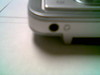
However, the use of an oversized adapter can lead to some problems later on. After about a year of use, the Lifedrive will surprise you one day by not playing any sound via the built in speakers. However, it will play if you insert an adapter into the headphone jack and distribute the sound to your car/headphone.

There appears to be an electrical short that I believe is probably caused by some of the larger headphone jacks. However, the cure for this problem is truly amazing!

First of all, there is no need to open the Lifedrive. What I have found is that by using an adapter, placed into the headphone jack and toggling it a little to the left or right, loosens the connection and restores the sound. Now this may not work for every situation, but it works almost all of the time. I have only had this happen to me twice and this solution appeared to correct the problem almost immediately.

A few pointers on preventing the problem:

1. Try to use ipod approved headphones or accessories for the headphone jack.

2. Sennheiser makes one of the best headphones and their convertible jacks fit perfectly.

3. If you find that you are having to push the jack into the Lifedrive excessively, then you probably have the wrong size.

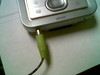
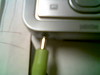
4. If the toggle example does not work, then you may try placing an ipod approved headphone jack half way into the jack and "push" the jack a little to one side. This works also, but you must be very careful not to break the device. See picture below.


This is a little MacGyverish, but it seems to work. I will try to put some more tips on preserving your device as more problems arise. Your feedback on this, as always, is greatly appreciated.

Hope this helps.....LDD.

Friday, October 13, 2006

Google Maps for Treo: A Truly Amazing Experience on the Lifedrive.


Googlemaps.prc

Google quietly released its Googlemaps for Treo devices. There is only one thing to say about this program: AWESOME!

It can be downloaded to the Lifedrive without problems and the link given above takes you directly there. If you prefer, you may go to Google and download it directly from the mobile site.

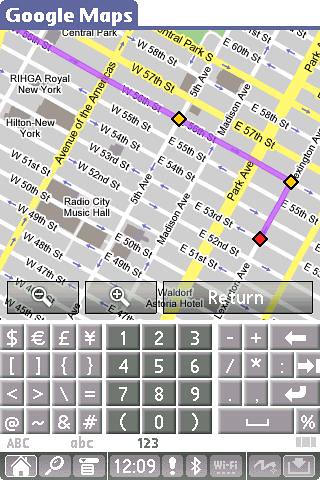
The rendering on the Lifedrive is absolutely superb, not to mention flawless! Directions are stored on your device as are prior searches. You can also see satellite images, rendered perfectly on the lifedrive screen. See my pics below.

This is another example of well written software. No crashes, just responsive, slick software written solely with the user in mind. Of note, this program may also be loaded directly to the SD card and run directly from there.

If there is one program that could make me jump ship from the Stand-alone PDA and venture into the land of the phone-PDA, this would be it. But not for the reasons that you may envision. On the Lifedrive, the program is flawless. It even breaks out to send a message to my bluetooth phone to call a location if I want it to. The screen is beautiful and it is not power intensive.

Where the only problem relating to this well written program lies is with the telephone company. If you do not have a data plan that allows say 10-20 mb/month downloads, you could be in for a nasty surprise at the end of the month. I was able to test the program out on my preexisting bluetooth network and it was flawless. However, I have not ventured to use this on GPRS or EDGE, for fear that it will use up all of my memory for the month in the space of 2 minutes. As it stood, two direction searches used up 2.8mb and its rendering of images as you scroll from location to location requires more download memory.

As of now, Sprint may be the only American Telco that would prove beneficial for the download memory requirements, unless you have an unlimited plan. Herein lies the biggest setback for mobile phones and mobile media in general. A few telephone companies have a locked-in strategy to keep everything in their garden. And they charge a hefty fee for the privilege. It holds back substantial innovation from companies such as Google and even Palm, which must play ball with the Telcos - notice Mr. Ed Colligan avoiding the question of pricing for the Treo 680 yesterday. It is the gorging of the consumer by the Telcos that enables me to stick with my Lifedrive and to use a landlocked machine or intermittently use my bluetooth phone for the data that I need. I cannot justify paying $35+ per month to use a Telco invented PDA based data plan on top of a voice plan.

But departing from this, it is a company such as Google that may show us the way out of this quagmire. If they can open up the lines for free or minimal-charge WIFI, the Telcos will have to drop the price substantially, leading to greater competition.

Google has taken a great step forward with the creation of a portable Google mapping software. Now, if they could only make a universal Calendar program, that would be golden.

Google Maps First Hand Account

Here is a pictoral summary of my unbelievable experience with this software:


1. Select your destination and confirmation will be given in the form of a map display

GOOGLE MAPS0000


2. If the address that you enter is valid, you will receive confirmation that the address that you typed in really exists. Sometimes, even a phone number will show up for a business establishment, along with the name of the company. This is followed with the functions listed below. You may choose to go to the location or depart from it.

GOOGLE MAPS0001


3. Once you have entered your data, a summary page will show up showing how many miles are between the two points. If you run or bike, this is absolutely amazing.

GOOGLE MAPS0002


4. Each colour point indicates a turn or change in direction.

GOOGLE MAPS0004


5. Once clicking on a colour point, directions are given for each main turn.

GOOGLE MAPS0003


6. You can zoom-in to see more detail and to pick out landmarks. Although not featured here, you can have indicators for restaurants, gas stations and other selected places of interest.

GOOGLE MAPS0005


7. You can further zoom-in to see the area in more detail. Notice how the one way streets are also displayed. A very important point if you DON'T live in NYC.

GOOGLE MAPS0006


8. You can change the image to view a satellite photo of your location.

GOOGLE MAPS0007


9. More unbelievable is the more detailed image shown below after zooming-in again:

GOOGLE MAPS0008


10. Alas, the cost of this show of brilliance? A data plan is a necessity if you are using this program. This may be a little difficult if you are using this with a bluetooth phone connection with only a 4 or 5mb monthly account. This is probably why it was originally written for the Treo, which necessitates a special high priced data plan. It is nice of google to put in how much data has been downloaded as this takes the guess work out of doing this.

GOOGLE MAPS0009


Again, a truly brilliant piece of software. If you own a Lifedrive or Treo or Tungsten X, you owe it to yourself to download this. Truly Amazing !


LDD.

Thursday, September 21, 2006

Near Nirvhana with Nokia


Over the past few months I have been looking for a solution to end my relationship with my favorite phone the Nokia 6310i. The phone has been a beauty for me for many years. It could do everything that I wanted and above all else, communicated with my Palm Pilots 'all of the time.'

During the early days, my faithful Palm Tungsten T would surf the web flawlessly using the bluetooth connection and when the memory of the phone was full in the address fields, the Palm was an amicable substitute with its bluetooth connection to dial friends.

When I purchased my lifedrive, I was a little disappointed that the transition was not seemless, but this ended when Palm came out with a few phone updates that corrected the issue and I was satisfied. So, when an unfortunate stool finally broke the faithful Nokia 6310i, a phone that was dropped, flung, stomped-on, drenched and sat-on (accidentally, of course) finally gave its last electronic blurb, I knew that it was time to move on.

Although "The Brick" (as it has been affectionately called) still continued to work and despite the constant berating that took place from my coworkers, friends and family for carrying such a "large" phone, I enjoyed the seemless nature of it. What made matters worse was the fact that I could not find a replacement and carried the broken "brick" around for almost five months before replacing it.


The Contenders

I looked at the RAZR and, with all of the discounts available, thought that this would be a worthwhile replacement, however the RAZR was actually slower than "The Brick." The menu system was akin to starting Windows. Although the bluetooth connection was nice, it felt clunky and slow. Cute, but not practical.

Next, was the Sony Ericsson. There were many model numbers to choose from but even though they were all nice, with a decent menu system, I could not find a bargain among them. And my rule is: If I have to pay a house payment for a phone, I am afraid that it will not do. So, cute but too expensive.

I looked at a few Samsung models next, but could not find any that came close to matching "The Brick." Most did not support bluetooth, but all had magnificent screens. Infact, I would have to say that just about all of the Samsung phones that I tested had magnificent screens and excellent print and video quality. But again, if I couldn't use it with my Lifedrive, I couldn't use it - period.


Enlightenment.......

Then it came! A glow, the parting of the clouds, an angelic sound through the quagmire of despair. Could it be? ..........

I perused the store looking at a small form factor phone. Odd, was the fact that the phone was a flip phone. Why? Because Nokia is not known for making flip-phones. They, and I say this proudly, MAKE BRICKS !!! BRICKS THAT WORK !!!! But this was beautiful. Akin to seeing the girl of your dreams from a distance and not being able to open your mouth to say hello. It flipped, it's menu system was very intuitive. The address book was familiar, the menu system was familiar and of course bluetooth and infrared all in one package. I turned on my lifedrive and in no-time flat was connected to the internet through the phone. I was able to upload my address book to the phone without making any modifications in the address book sequence. It saved vcards accurately. It's bluetooth connection to my Lifedrive, dare I say it, was actually faster than The Brick. And it timed out after lack of use after 3 minutes, instead of randomly as it had done previously on The Brick, while surfing the internet.

The Nokia 6102i is a splendid phone. It has a small form factor and works FLAWLESSLY with the Lifedrive. There is absolutely no need to download any additional software to update the bluetooth connection. Its affiliation with the address book works flawlessly. There have been some reports that the picture quality is not that great, but for me, I bought the phone to speak to others, not to take pictures.

A real plus is that you can send all of your photos or movies taken from the phone to your Lifedrive via bluetooth or via infrared and clear the memory that way. Additionally, the phone comes with software that connects to your computer which can do the same. Additionally, you can transfer multimedia files from your lifedrive to your phone and vice versa all wirelessly. I have even surprisingly surfed the web via a bluetooth connection with my Lifedrive connected to the phone and conducted a call via the speaker function of the phone.

Worth taking a look, I think that this phone is a worthy successor to the 6310i if you are in the running for a new LIFEDRIVE-Compatible phone. There are many phones that are probably better, but for the incredibly discounted prices that are now out, this phone is very hard to beat.

LDD.

Sunday, July 23, 2006

Patriot Memory 4 gb SD Card. First Hand Account,


On friday I found an article in Palmaddicts on a new memory card released by this relatively obscure company. The company claimed to have a 4g SD card (not the new SDHC or USB 2.0 variety reported in my last article) that was capable of being used by just about any SD-available device.

Well, I was somewhat skeptical of course, but I am off on a family vacation this week and I will need all of the free memory that I can muster on layover flights. Last year the Lifedrive was very handy. I kept a series of movies that the kids could watch while at the airport or if they became unruly on the plane. Our usual DVD player had poor battery life and the Lifedrive was absolutely magnificent, especially when hooked up to a car stereo speaker or via joint headphones. However, the machine would need to be recharged constantly, particularly if I wanted to use it for web surfing.

Thus when I saw this article in Palmaddicts, I immediately remembered that during the year, after a few other plane rides, the battery life was magnificent if the movies were being played from an SD card, rather than the disk drive. 1 gigabyte was okay for podcasts and 2 movies, but 4 gigabytes could ensure very high quality playback and a very peaceful plane and car flight. The ability to watch a few movies and my DVD box sets of "24" , "House" and the first season of "Gray's Anatomy" was just too compelling (I do not watch television and I buy the box sets in the hope of watching these things eventually, based upon recommendations by my wife and friends).

I purchased the SD card yesterday for $85.00. I mention the price, because I paid $60.00 for the combo USB/SD Sandisk Ultra card 2 months ago and $80 for the original Sandisk 1gb SD Ultra card a year ago. The price of memory has declined substantially.

My first thoughts upon feeling the card was how thick and heavy it was, compared to the Sandisk cards. The workmanship appeared to be very good, with no dents, paint errors or sloppy misspellings of the labels. I thought it would be good to just place the blank card in the Lifedrive to see how it would respond. Immediately, the Lifedrive informed me that it could not open the card because it was not formatted. It did not offer formatting options. I branched out of this and discovered that the card did not show up in the right upper dropdown display. I then performed a soft reset, remembering that this tends to clear the memory. Not only did it clear the memory, but it formatted the card to FAT-32. I checked the memory of the card, using INFO and found that I had 3.8 gigabytes available. Sounds familiar !!!! I think the Lifedrive Disk had the same amount of available memory when it came out of the box.

I then placed the card in a card reader and began to use it as a regular computer directory, uploading my home movies and the aforementioned programs. I also downloaded a fresh copy of TCPMP and its associated AAC plug-in. I placed this in the already-provided Palm/Launcher directory (appeared after the lifedrive formatted the disc) . If you look at my previous post, you will note that TCPMP tends to crash a lot less often - if at all - if it is run from the SD card.

Voila !!! Success. The SD card runs perfectly on the Palm Lifedrive. There is almost no delay in access times. I can fast forward, reverse, enlarge, rotate and skip as with the Sandisk 1g cards and faster than if I used the harddrive. Access times appear to be comparable to the Sandisk, although I did not do a formal study to test this.

The SD card is a winner in my book. I am thinking of picking up another one to emulate the Ipod nano. Having a full 8 gigabytes of memory at my disposal is very nice. Infact, if you told me that I would have 8 gigabytes of memory on a Palm 5 years ago, I would have asked "what for?" Today, we have programs and files that can access and make useful this type of memory. The new SDHC cards that will be released this year will add even more capacity to these incredible tools of ours. If the Patriot Memory card is a peek at what is to come, hang on to your hats.

In the medical field, I think that the time has come for on-demand medical video. Medical videos are just as tedious to watch for those of us in the medical profession as it is for the layperson. Condensing these down to our small mpeg player formats would be beneficial. Additionally with the increase in memory size, Podcasts should be used instead of CD's. While on the plane, I will actually be listening to and watching 2 medically relevant programs. Something that I could not bring myself to do at home. Both files took up collectively 128mb of the 4 gig space.

Again, the Patriot Memory Card 4g appears to be flawless on the Lifedrive in this initial test. Although a word of caution is needed. I will not place any mission critical information on the device until I have used it for over a month. So for now, I will only place multimedia files on the SD card. I will keep you informed.


LDD.

Thursday, July 13, 2006

Lifedrive Essentials: Bluetooth -- The Other Broadband (The Axis 9010)


A year ago when I bought my Lifedrive, I tinkered around with at least two broadband devices for wifi access. I already had a hardwire router and did not want to change over to a wireless router since I did so very little wireless computing to begin with. I picked up a D-Link router (purchased at a store opening for $10) and tried to use it as an Access Point. This was just plain stupidity and led to a few wasted hours trying to do configurations which would just end up in the router trying to be ...well, a router instead of an Access Point. I then picked up a Linksys Access Point and this, for the most part, worked very well. However, it was not without its own problems. The Lifedrive was very finnicky and crashed on several occasions. Yes it was very fast downloading files and webpages in what appeared to be no-time flat. But along with this wonderful speed came a few problems:

1. The Link was essentially always on.
2. Always on would lead to about a 15-30 minute battery life.
3. Security was a major issue. I found a few names accessing the Access Point that were not mine. A problem resolved when I changed to WPA instead of WEP.
4. The Lifedrive (1.0 OS) was essentially unstable after leaving Versamail and Blazer.

Then, the Access Point would run into other problems. For some unknown reason once I changed the encryption from WEP to WPA for greater security, the Lifedrive would tend to crash or slow down considerably. The longer the WPA key string was, the longer my download times and the greater the connection issues decreasing the battery life.

One solution that cropped up over this time frame was a wireless solution that I had used with my old Tungsten T -- Bluetooth! Just about all advanced Palms link up well with bluetooth phones so I took the logical step of having the machine link with an Access point through a network to print out documents. This was relatively advanced at the time and worked extremely well with the Tungsten T. The device, the Axis 9010 pictured above was originally listed at $400, but I was able to buy one from an auction site for about $40.00. It runs on Linux and is extremely easy to program. The one thing that I liked about it was the fact that its range was supposed to be about 50 feet, but you could get it to about 100 feet and surf without worrying about anyone attaching to the network. Most Wardrivers are not really looking for a bluetooth Lan connection. Additionally the Axis uses RADIUS which is relatively more secure than even a regular WEP or WPA secure connection.

Thus when my Linksys started acting strangely I took out the Axis 9010 Access Point and put it back to work with my Lifedrive. It has been flawless. Infact, although it works at only 1/10th the speed of the Linksys, it provides a consistent and constant data transfer rate. One of my favorite things about the bluetooth access point is the fact that the Lifedrive and the access point stop communicating with each other once the files have been downloaded or the webpage completed. Thus, downloading a 10mb podcast for example will take about 5 minutes, but once it is done, the transmitter for the Access point stops as does the Lifedrive. The Lifedrive will shut off 3 minutes after the completion of the download, but not during it. Thus battery life is conserved rather nicely.

The throughput speeds are not amenable to access SKYPE or anything like that. But if you download, surf or print intermittently the access point is something that you should look at very closely, particularly if you are having problems with WEP/WPA or the 802.x solution. I keep it as a backup, but for the last few months I have been using bluetooth exclusively.

My take on the bluetooth functionality working better on the Lifedrive than on the 802.x solution is that I believe that Palm has been working with IR (Infrared) longer than just about anyone. Additionally, with the introduction of the Tungsten T, Palm became increasingly resilient and aggressive in regards to having communications transmitted over both IR and Bluetooth. I think that the European market, which at the time was very involved in Bluetooth communications, became a major target for Palm. Ericsson and Nokia were phenomenal in this and the ability to communicate with the Palm was instrumental in the success of the early Tungsten products. With Palm continuing to produce three different versions of the Tungsten, bluetooth became perfected over time. Add to this the fact that many, including myself, became increasingly bothered by the hotsync process, the ability to do this via wifi was very appealing. While their competitors concentrated on the 802.x position for wifi access, Palm chose Bluetooth. Hindsight would dictate that the 802.x position won this battle, but in terms of battery preservation and security I believe that Palm was right.

802.x on the other hand, seems to be something of a thorn in the side of Palm for the past few years and a much newer technology to Palm. None of the current Treos, including the new 700 series have native 802.x wireless lan with the Palm OS. The Lifedrive was one of the first products in the Palm line to come out with dual Bluetooth/802.x Lan support. In other words, up to and including the release of the Lifedrive, wireless lan in the form of 802.x is still a work in progress.

The plus for us "old guys" is that if the Wifi link is broken or there are problems with the conventional access points then Bluetooth from home is still an option. With the preservation of battery life one can have a rewarding experience with a bluetooth Access Point. The downloading of web pages is a little slower but reliable.


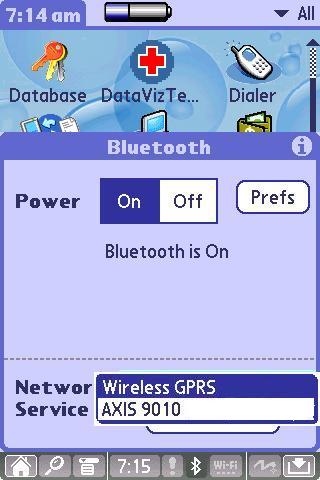
Setting up the Bluetooth Lan for the Lifedrive is very easy. Just open the bluetooth connection screen and have the machine search for the Bluetooth Lan Access Point (Axis 9010) while it is on. The Lifedrive's software takes care of the set up.


One of the nice things about this set up is that if you have a bluetooth telephone, all you have to do when you want to switch from one to the other is choose (See diagram). In addition, if you can get more than one Axis Access Point, the two can be linked together to produce a relay access point. I have used this once or twice, but there is an obvious delay with response times trying to do this. But again, if you are just accessing small files or doing IM, the delay is not that noticeable. For the most part, for small solutions one Axis 9010 is sufficient. Note that the Axis 9010 as with other bluetooth access points essentially works with any networkable bluetooth device. This means that you can use it with just about any Palm device that has bluetooth Lan, that includes the entire Tungsten line, including the Tungsten T (my favorite device for form factor). It also means that it will work with all other non-palm bluetooth network devices. The device is also very much compatible with up to 5 simultaneous connections. The official document states 6, but your connection speed tends to be untenable with 6 and I have found 5 to be compatible with no appreciable delay in either upload or download times.

Technical:

The Axis 9010 has the following:

1. Axis ETRAX 100 LX, 32 bit RISC, 100 MIPS CPU. With relatively excellent parallel computing and no appreciable degradation in signal with 5 simultaneous connections per my observation.

2. 16 Mbyte DRAM, 4 Mbyte Flash.

3. RADIUS authentication protocol. Of note, Linksys actually charges extra for RADIUS support with its 802.xx products. With the Axis, this is free.

4. Full Spec Sheet

5. Software: Embedded Linux.


Alas, the Axis 9010 is currently unavailable, having been discontinued by Axis, but a used machine can be found with due diligence and I would say that if you are looking for a relatively stable and low-battery consuming access to the internet with your Lifedrive or Bluetooth-Lan device, this product should receive your attention.


LDD.

Sunday, July 02, 2006

Lifedrive Essentials -- Which Memory Do You Serve?

I have owned the Lifedrive for almost a year now and I must say that I am pleased with it over the past 6 months, mainly because I have not put a lot of software on the device and because I have not hotsynced the device in almostthe same length of time. However, this weekend, I am going to have to bite the bullet and go through the hotsyncing process again. Why? Well, I have just discovered that all that glitters is not Gold.

One of my favorite applications, SplashID has its main data file stored in the Lifedrive's memory. Essentially, I usually store and run the program from an SD card. Since it is encrypted, I felt that it would be safer to have it on the card than on the machine. Well, I copied the sd card to my regular Tungsten T and found that all of my entries were not listed and that when I removed the sd card, the icon and the program were still on the lifedrive. Perhaps a sophomoric error - and I can just about hear the jeers and snide elements of the Palm Programming community having a jolly good laugh - but I was able to do this with another program, TCPMP. This program is an open source project ( a brilliant program by the way, as is SplashID), that is used to watch videos on the Lifedrive. Once stored on the SD card, it can be run directly from the card. I decided to test out my theory that I have been deluding myself all of this time by thinking that the program was self-contained on the SD card and not in the Lifedrive. I downloaded an addition to the program that allows you to view files stored in the .MP4 format and placed it in the same SD directory as TCPMP. I then clicked on the SD stored icon and I was able to watch the .MP4 video without a problem. However, when I shut down the machine and hit the icon in the Lifedrive's main memory, I could not watch the .MP4 file. Thus the question, was the Palm running directly from the SD card or was it running from the Lifedrive main memory when the icons were clicked?

Why is this so important? Well, if you are like me, your world on the Lifedrive has changed dramatically if you directly upload your .PRC files directly to a directory called /LAUNCHER on an SD card as opposed to using the hotsync or Lifedrive docking pathway. The former is an exercise in patience while the latter is an exercise in forgiveness. The latter tends to crash your Lifedrive's hard-drive more frequently, while using the ubiquitous hotsyncing tends to take longer than anticipated and can be brought to a dead stop if it finds an error. But all of this may be irrelevant if the Lifedrive is actually storing the data in the main memory - particularly for SplashID. As the saying goes, as the Lifedrive goes, so does my peripheral brain. Thus tonight I will have to back up everything so that I can preserve all of the passwords that I cannot possibly memorize.

Another reason for backing up the old machine is the fact that it is begining to slow down and the On/Off switch is doing a few fancy tricks that it has not done in over 6 months. All of these little things spell HARD RESET coming down the pike. Although some of this derision may have been self inflicted. Upon perusing the Palmaddict site I ran into a few programs that I thought would be brilliant to have in my mobile brain. Medical essentials such as FIFA FOOTBALL and PAC-MAN, along with a memory game all enticed me to the download front. Again, applying my /Launcher direct insertion on the SD card, the programs ran flawlessly. I could not see any remnants of them after I finished using them (Zfile and other scouring programs), but a funny thing started happening a few days later. Soft-Resets started occurring with a few. So I began deleting all except FIFA and that appears to have stopped the carnage. However, there is still a little sluggishness to the machine that I believe would be remedied with a hot sync. Additionally, it would seem appropriate to finally upgrade the operating system to v 2.0 as others are begining to find it a bit more stable.

If anyone has any insights into this dilemma, I would be very much appreciative. Below is a list of some memory insights that I have found over the past year and a few suggestions:


1. Splash ID - Possibility to run from the SD card, but uncertain if the data is stored only on the Lifedrive memory or the SD card.

Addendum: A thread on the Splashdata message boards on Yahoo seems to address this very problem. The data is stored in the Lifedrive main memory, but you can backup the main data file to an SD card, but it will not run from there. Check out the Yahoo Message board for more details.

2. TCPMP - I think it runs directly from the SD Card. The two versions that I have on the machine and the SD card appear to act differently. I used to have this in the main memory only, but I found that it kept on crashing after exiting. When I moved to storing it strictly on the SD card, the load times were a little slower (proof that it was running directly from the card?) but there were no crashes and the program ran smoothly.

3. pTunes - A very interesting discovery on the podcast trail. If you listen to a podcast or a song from the Lifedrive itself, you cannot fast-forward to skip from ie. 00:20:00 to 00:25:00 for example ( I think that this is better explained as intrasong / intrapodcast/ intrafile fastforwarding) , pressing the circular key forward will send you to a different file/song/podcast. However, if you store the files on an SD card and run them from there, there is an increase in speed by almost 50% and interfile fastforwarding is simple, fast and accurate.

4. MobiOffice - Storing a copy of all data files on an SD card (found in the directory /Programs) will thwart the need to hotsync your data and provides a good backup source that is accomplished in seconds rather than minutes. Additionally, you have the freedom of updating or not updating the files which can take a long time if you hotsync.

5. Printboy - I have not been able to get this to work with the Lifedrive, regardless of where I load the file. Even with hotsyncing, this thing just crashes.

6. Lifedrive drive memory - Probably best served by not using any more than 80% of its 3.8 gigabyte capacity. More than that and I have found sluggishness. Additionally, I have not found this to be a very good place to store files or to run programs from. It is what it is! A multimedia storage center. You can apparently upload gigabytes of photos, videos and sound files and address them using TCPMP or pTUNES without much of a problem, ie crashing. But running software from the area is like flying across the Bermuda Triangle in a Cessna.

7. MobiDatabase - Storing all files in the Lifedrives' main memory is your best bet. Storing them on the SD card is another exercise in patience when the program addresses the database. The beautiful, yet feared sound of ker-clink is met if you try to store your file on the 3.8 gigabyte space, rendering your database dead! Ker-Clink - the sound of a soft reset - is not readily found if the files are stored in the main memory however. Thus backing them up to the SD card is probably best.

8. Control -- The act of waiting for others to try out a piece of software before deciding to jump into the waters and loading it up on your Lifedrive.


I hope this helps. I am thinking about putting up a few basic Lifedrive survival tips, since I think that I can now help a few people from falling into despair when the Ker-Clink monster eventually arrives.

LDD.

PS. Thanks to those of you who have written to me in regards to the Lifedrivedoc.com beta site. As you can see I took the site down although I liked the design of it and spent a long time trying to get it perfected. The problem was not with the website, which was a beta - (the final site WOULD not have had that bawdy flyer) - but I ran into some issues with the ISP that could not be resolved easily. As soon as it is completed, I will let everyone know. Again thanks for your support.

LDD.

Addendum2: A brief note about some communication I had with Michael Verive, he is the author of NSBASIC for Palm OS. According to Mike, all of the Palm software is loaded into the main memory of the Lifedrive before it is run. Some apps which are written in NSBASIC will look for a file that is installed into the main memory of the Lifedrive called Runtime. If the file is absent then the program and usually the Lifedrive crashes. Many applications are now being written as FAT APPS, containing their own runtime program. This makes some programs run better than others, mainly because they do not have to look for the NSRUNTIME program of which there are many versions. Thanks Mike.

LDD.

Friday, June 16, 2006

MobiSystems Releases OfficeSuite 7.0

In what can be seen as an eagerly anticipated update, Mobisystems released OfficeSuite Classic and OfficeSuite Pro 7.0. In the Lifedrive community, Mobisystems has been a breath of fresh air in the Office Suite market, designing a product in Office 6 that worked right out of the "box," without the need to download updates or additional software to make it work on the Lifedrive. They introduced a filesearch system that was as much a copy of the windows explorer model that one could have and then gave away 4mb of ftp space per user to upload and download files. Now, version 7 has a few perks added to a product that almost appeared to be too good to be true.


First, they have reportedly sped up the file opening times which were significantly slow. They have maintained support for the usual office file types in native mode - DOC, TXT, RTF, XLS, XML, and CSV file formats, but surprisingly absent in the list is .ppt or the native powerpoint filetype. The RTF format is a nice one to have since you no longer have to use Word to type or import and send documents. You can now use WRITE which comes with Windows. Alas, there is no native support for the open source formats ---yet!

They have introduced predictive text in the word program and have provided 6 free language dictionaries - English, German, French, Spanish, Italian and Dutch. They also have a windows desktop companion to ensure that your documents are up to date - according to Mobi. Most of the time, I keep my files on an sd card in the event of a fatal crash, but this is still a good option for verifying and updating the files that are in memory.

There is now a direct print feature that supports printing from the Word document directly. This will require that PrintBoy is installed however. Charting is provided in the Excel product with -- according to Mobi -- excellent duplication of charts both from the desktop Excel program to the Mobiproduct and vice versa in native mode. I will be downloading this to verify that this is the case over the next few days. This will truly be a significant step for Mobi if this works out as stated.

They continue to use the Explorer type filesystem which I believe is one of the best ever. It is so intuitive and the addition of the ftp directory as part of the explorer type directory is seamless, logical and functional.

If there is a concern for the new product it is the new dependence upon third party vendors. Mobi 6.0 was a fantastic product because it incorporated a few unique additions that set the product apart -- the filesystem, ftp storage, crisp, clean and accurate rendering of documents without modifying the files and instant compatibility with the Lifedrive. Where there were weaknesses, Office 7.0 seems to be the correction factor -- Speed of opening files, printing from documents and the new direct native .PDF support.

Where the concern lies is in the latter two. They have apparently conquered the file opening speed problem (again, I will be testing this to see if this is truly different). But they are relying on third party vendors for the latter two issues. They are requiring that PRINTBOY is installed in the Lifedrive before the files can be printed. For me, I have not gotten Printboy to work on my Lifedrive despite the numerous times that I have tried. Infact, I gave up on this solution months ago and turned to saving things on an SD Card and opening Write, Word or OpenOffice to print it out. Hopefully there is a resolution to this particular problem.

Secondly, they are relying on an "opensource" third party program from Metaviewsoft called PALMPDF. This is a port of a previous program called XPDF, which is the original opensource pdf reader. More about this can be read here -> PalmPDF/xPDF. In a few comments on PalmAddict, many bugfixes were done in a version of PALMPDF published in february, which represented version 1.1. In November just 3 months prior version 0.8 was discussed in PalmAddicts. Metaviewsoft, located in Germany is doing what amounts to be a wonderful job in trying to get the Palm OS to work with PDF files and giving away the program, but I think that this is still a beta product and with the constant updating still appears to have issues. Metaviewsoft has released only free copies of the program, but this may change once the final product is released. Again, I am not criticising them for what they are doing, I think that this is a good idea for all to have this company create a standalone product like this, but I have some reservations about a major company such as Mobisystems taking a chance on beta software to be a part of their product. I think that I would have had more confidence if I knew that Mobi was creating the printing and native pdf software to run flawlessly with their products.

With this as the only flaw that I have noticed, I will be purchasing Mobi's updated package over the next few days and because it is a core product of mine, I will be giving a review of my experiences over the next few weeks. The pricepoints for the product are listed below:

Basic Office 7 (Docs, Spreadsheet, Slides, OfficeSuite Desktop and Font Convertor) $39.95, Upgrade $ 14.95.

Professional Office (
Docs, Spreadsheet, Slides, Database Professional, Paint, OfficeSuite Desktop and Font Convertor) $69.95, Upgrade $ ??? (Possibly 14.95).

An incidental note is made that the version of OFFICESUITE is 7.5. It would appear that they have been working on this one for quite a while. I am very excited to try out this new piece of software and I will be certain to send updates of my experiences.


LDD.