Welcome

Lifedrivedoc.com began as a place to talk about the Lifedrive. It soon became apparent that it was much more than that. Since moving on from my Lifedrive, I am engaged in more avenues of technology. That technology has intersected with my professional life - Medicine as well as my social life.

As noted above, the blog is about a lot of things in relation to technology. If you are looking for Lifedrive related material, I am currently dividing the blog so that those searches will be easy for you to find. Most of them will be pre 2007, that should help. Additionally, if you are looking for the links that used to be on the left border. They will be back up in a different format soon. I do enjoy reading about new things to do with the Lifedrive, so you can feel free to let me know about those. I will also post those on the site.

If you are having trouble getting an RSS Feed, click on the feed link below or type this into your reader: http://feeds.feedburner.com/lifedrivedoccom


Enjoy.
Showing posts with label Hardware. Show all posts

Wednesday, January 19, 2011

Getting Lifedrive Parts.....


I was tinkering the other day with an old Lifedrive and wondered where I could buy a new battery.  I stumbled upon a wonderful site that has used parts, but that are still functional.   So for those of you who are hungry for a bit of nostalgia and if you think that you are relatively risk averse, you should pay a visit to Used Pda Parts:

http://usedpdaparts.com/Lifedrive.html


LDD.

Credits:  Picture of Lifedrive Motherboard. 

Tuesday, December 28, 2010

The Best Device for 2010.....

Folks, I know the iPad has had the reputation of being the best device for 2010.  It's on the wish list of many, but here's a story that may make you go Mmmgh?

I had the opportunity to purchase an iPad earlier this year.  It was a gift actually that was to be given to me some time in August.  I passed on the gift immediately.  I was told about how many wonderful apps that were available for it and how the simple act of buying an app once meant that it could be utilized on an iPhone and an iPad.  I was shown the simplicity of reading books and the running of gadgets from remote controlled apps.   I thought that this was wonderful.

However, I declined the iPad!   Yes, folks, I declined the hottest gadget of the year.  The gadget that is simply the best in its class - that of Tablet Computing.  So I know that you are asking the very question that many of my other friends have asked:  WHY?  And more importantly, what is the best gadget, in your opinion, for 2010?

For me, the gadget of the year is quite simply Amazon's KINDLE.

What I did not tell you in the first paragraph above was that I have a very large library of books.  Books that I never get to carry around with me.  They range from novels to sonnets to medical literature.  I have well over 1,000 journals, which I rarely get the chance to read and therefore am subjected to buying a subscription to a Journal Reviewer, reading in depth the articles that are germaine to me.  I rarely get the opportunity to read novels and when I do, I usually don't have the book with me.   What I needed was an electronic book device.  Something that just did electronic books.  I did not want something with email, twitter, You Tube or any such distractions.  I wanted a serious e-book reader.  No tweeting, beeping, ringing interruptions.  Just words on a page.  I wasn't interested in color or pictures.  Just WORDS.

The Kindle or more importantly, The Kindle 3 is perhaps the best e-book reader ever invented.  As of 2010 of course.  The iPad simply does not compare when it comes to reading a novel on the device for over an hour.  I tried to read on an iPad that was loaned to me and I immediately became fatigued trying to read at night.   Additionally, the iPad, excellent as it may be as a mobile utility device, is much too heavy to be considered a dedicated e-book reader or book replacement. It is too distracting, with its apps, alerts etc., to be considered a serious e-book reader.  Now, I am not putting the iPad down, but simply stating that if you are looking to read books and only books, then the Kindle is the better choice.

So, are there weaknesses to the Kindle?  You bet.  First, you really do need to have the same brightness that you would have to read a regular book available to you.  Otherwise, you will need to buy a cover which has a built in light source or buy another light source.  There is no back light, as seen with the iPad. 
Second, if you are into color pictures, the iPad is for you.  The Kindle shows only gray scale images.  Again, it is for reading.  Thus I would not recommend it for Magazine reading.  Nor would I recommend it for PDF books.  The manipulation that needs to go on with trying to read a PDF is just not feasible for long articles.
Third, after playing with the iPhone, any Smart phone or an iPad or iPod Touch, you have this feeling that everything that has a small screen needs to be touched to make the words and images move.  Thus page turns, character enlargement etc., are intuitively managed by Touch Screen -- On An iPad.  But not on a Kindle.  There are still ancient Touch buttons on the side and a relatively antiquated hard key keyboard.

But what beauty there is lies in the Software that Amazon has chosen to use.  Let me first say that Linux is always loved and the OS appears to be a version of this.   You can add books to the Kindle in many different ways.  You can use Amazon's WhisperSync which does over-the-air downloads via 3G or Wifi.  And did I mention that the 3G is free, without registering?   Yes, it's relatively slow if you want to surf the web, but for obtaining books, it's wonderful.  You can also Archive by just erasing a book off your KINDLE.  You can save an entire folder, which contains all of your books from the KINDLE to your PC.  This is great if you want to upgrade a Kindle.  You just download the folder and store it on your hard drive.  This also allows you to save files on the Kindle and use its 4 gig memory as a hard drive.  You can upload Audiobooks via this route also or MP3 files.

One amazing feature that I loved was during an hour of reading a classic.  I couldn't move, but I had to go to the bathroom.  Well, you can let the Kindle read to you.  It will ( in its really nice phonetic voice, which I might add is quite human-like) continue reading where ever you have left off.  Really great for bathroom breaks :).

The Kindle is small enough to keep in your bag or jacket.  It can download updates if you like, in the background.  Additionally, you can turn off the Wifi and save the battery.  I have used it for 22 days straight on a single charge once.  Normally, I will charge it on weekends though.  What is good however is the ability to read anywhere, anytime.  And if I forget the device, well, I can continue the reading on my phone if I wish.

One important feature about the Kindle is the lack of a back light.  I point this out because it is very important.  I can read a Kindle for at least an hour straight, without stopping because I do not have a large back light shining into my eyes.  That back light is okay if you are reading at 7pm.  But at 10pm, this is a strain.  I have tried reading my iPhone at night and I hate it.  It's too bright.

Of note, the 1000 journals will not be archived.  For that I am actually going to use an iPad.  The PDF restriction is an issue there.  Also, for technical reading, I really would not recommend the Kindle, at least for medical technical reading.  If you have to jump back and forth, several times, then an iPad is better.  But luckily, I have found a wonderful niche for my Kindle.  It is now the proud provider of all of my classic novels and since they are free, the list is now well over 100 in size.  I look forward to reading Moby Dick and Brave New World many years later and from a different perspective than I had before.  The non reflective nature of the Kindle makes it a winner anywhere.  And the fact that I will not be distracted by the web when I am reading is just icing on the cake.

This is why I am calling the KINDLE 3 with WIFI & 3G the best Device for 2010.

Friday, November 05, 2010

One night with Kinect...wow!


So I had the opportunity to use Microsoft's new Kinect yesterday. Having a Wii, I had the opportunity to directly equate the two experiences. With the Wii, you have a unique controller waving in front of a bluetooth band sitting below or atop your television. With Kinect, you bring only your body to the game.

The Kinect device is eery! It is very accurate once it has locked onto who you are. It recognizes the shapes and sizes of individuals with very little effort. I was very impressed. More impressive is the responsiveness of the device. The obvious Wii imitator standard software that comes with the device is actually well worth owning. The games are pragmatic and really do well to simulate the actual body movements of the players. In addition, the ending photo snapshots and video snips can be sent to your facebook page or emailed to individuals. I was particularly impressed with the Volleyball game, which allowed you to Set, Pass and Spike the ball over the net as you would do in a real game of volleyball. With a two player game you can actually feel as though you are in the game itself. I think I may have lost 200 calories during one set!

The video response to movement is almost 1:1. Although I did not get the opportunity to try out the video conferencing feature, I can only imagine that this is also just as good.

What does Kinect feel like if you own a Wii? Well, it feels as though it is a Second Generation Wii, the device that Nintendo would have made next. It is really that good. My wife and kids enjoyed this device as well. We really see that the device has the potential to lead to other things, such as Yoga, video conferencing, real time tutorials with feedback. Throw in Netflix on the XBox and you soon get the idea that Microsoft is trying to lead the Living Room war.

Are there negatives? Well not really. Medically, there is always the question of not having tactile feedback to guide your extensions, but unlike the Wii, I actually feel immersed in the game itself on the Kinect, hence the visual aspects of the game tend to keep me from over extending on a spike and trying small, but varied tactile moves. Nevertheless, the entire family was extremely sore after playing.

As a disclaimer, the actual Kinect device used was from a friend at his house yesterday on the first day of its release. There is no question that I will be getting one as well. I really think that this is a great device. I do understand that Microsoft will be linking this with the new Windows Phone. Nice, but I'm attached to my iPhone. It may bode well for Windows Mobile. Like Microsoft or hate them, I really believe that this product will be a winner for Microsoft. Well done!

LDD.

Friday, June 25, 2010

Nalder's Lifedrive mLearning video...Neat.

Jonathan Nalder has made an interesting podcast entitled "Lifedrive mLearning."  It is an overview of the Lifedrive and I think it looks very interesting.  As explained on the website http://voicerecorderz.com/   "An www.mLearnxyz.net video overview of the Palm Lifedrive from an educational perspective."

Very nicely done.


LDD.
(Click on title to take you there).

Thursday, January 08, 2009

Palm Strikes Back!


Palm today announced at CES the introduction of the Palm Pre. It is a beautiful looking machine. I was very pleased to read that Palm will introduce multitasking to the device and incorporate true wifi. Of course, not many have had the chance to either play with or see the device in person, so I, like you, am relying on 3rd party reports, pictures and videos.

The form factor looks good, but it would appear that the iPhone has been emulated in many parts. Palm has done away with the Stylus and opted for Thumb swipes. Additionally, the swipes are truly "liquid" with no staccato type movements. Second, the Apple Apps store will have some competition, with Palm literally following in the footsteps of Apple to create its own Apps store. The question of course will be, will Palm allow independents to directly put their products on the device or will it be locked down like Apples'?

I did not see any video playbacks and have a few questions. First, will there be legacy support (ie. Smartlistogo)? Additionally, will everything be Web-Centric? What happens when the web goes down? Will it continue to work? Particularly with the combined email accounts.

Anyhow, I think that Palm is moving in the right direction (by the way does anyone know if this really Linux renamed?) and I commend Ed Colligan for coming out swinging. Now, they will have to get this thing on a GSM platform also.

I cannot wait to see a true review of this device and to see this thing in action. I am also interested to see which developers have actually signed on for this device.


LDD.

Thursday, July 03, 2008

Palm Getting Ready for Something New.....

I think that many of us have been predicting the fall of Palm for some time now. But a few sources are exclaiming that Palm is not quite done yet. Palm has apparently been working quietly on its new linux operating system NOVA. Additionally, they have had a very influential person in the design team for at least a year now. The designer of the Helio/Sidekick, Matias Duarte has been on board and is thought to have been brought over by Jon Rubinstein, the co inventor of the iPod.

This is very important news, because it means that Palm is betting the farm on NOVA. If this thing doesn't work, it could be lights out. It remains to be seen whether they will make a clean break or land in the world of Microsoft's Windows Mobile problem - trying to support legacy software. But for those of us sitting on the sidelines wondering whether we should jump ship to the Apple camp, this could be the twig that makes us sit up and take notice.

Again, for those of you not excited by this, this is big news. It means a complete overhaul of the Palm computing platform and more importantly a radical shift in the User Interface - maybe keyboards that can actually fit a real person, mmgh. I would say that if Palm can just keep on schedule, we may be looking at one of the greatest comebacks in the technology field. (Remember Palm ---- Lots of onboard memory, multitasking, wifi, gigabytes of extended memory and you'll do alright).


Resources:

Engadget.
Electronista.
Matias Duarte's blog.
Matias's Resume (pdf file).


Pictures: The Helio - Top Left.
The Sidekick - Bottom Right.


LDD.

Saturday, March 22, 2008

More waiting for Linux


I just received an email from a programmer stating that Palm Inc. is expected to release a Linux based OS code named NOVA. We can expect the first devices running Nova in the first quarter of 2009. Unil then, Palm will be pushing the Centro. According to this source, Access will continue to work on ALP Linux, but there is no certainty as to who will be building the devices in question for the ALP system.

In terms of compatibility, this appears to be a major hold up, in that both are working on backwards compatibility of software. To me, I think that they need to make a clean break, but I guess Palm's base is still entrenched in the old software.

Although most of this information has been out since January, I am only now starting to believe it due to the programmer discussing this with me. Additionally, I think that Palm may indeed pull out all of the stops in January or perhaps surprise us with a 3rd quarter release or announcement - just like the old days. Additionally, NS Basic appears to be one of the first companies to line up with Palm for the new Linux based machines. Good to hear.

Following my discussion with my programming friend, I scoured the internet for stories on this. The most interesting one came from PalmInfocenter's January posting. They have gone on to state that the next generation OS is currently being tested internally on a yet to be released product code-named Zeppelin.

More information, although this appears to be rumor (from mytreo.net) supports the probability that this new device will have wifi and may come under the Treo name (800's). Again this paragraph is all rumor. I stand by the paragraphs preceding this one.


LDD.

Friday, March 21, 2008

Software or Hardware?

So, another bad quarter for Palm Inc. You can read the numbers on a financial blog somewhere, they were dismal. Yes, the Centro is selling like hot cakes, but with its $99 price tag, it has done nothing for revenue or income and in fact has obviously cannibalised the Treo. On the conference call, there was mention of 2 new Treos coming out, but unless these have a very sexy look to them, this could be another dismal showing. There is some excitement knowing that one of Apples' hardware designers is now on the Palm team, but Palm will lose either way if they do what I believe they will: If they come up with a similar Treo that looks remotely like the 600 or 700 series, no one will be excited; if they come out with a brand new original "cool" Treo, but carrying the same OS 5 operating system, no one will be excited.

With the SDK being released for the iPhone, Palm essentially has 3 months to come up with something dramatic. The iPhone SDK, as I thought it would be, is actually quite amazing, according to a few developers whom I have spoken to. With Epocrates now releasing its software natively on the iPhone, we are seeing the migration to this device. It is only a matter of time, before Dataviz, Mobisystems and others do the same. I am expecting physicians to leave the Palm fold in droves. There is already an online petition being written for physicians to use the iphone as a medical device and requesting that software be written for it, leading to easy migration away from Palm.

I have not yet left! I am still using my Lifedrive, albeit reluctantly due to its lack of speed and its weight. Yes, I was excited about the refurbished iphones being sold by AT&T for $250.00, just slightly above what I would have expected to pay for a new TX. But I am still using a Palm device. Why? Well, it is not as simple as many on Engadget and other tech sites believe, to just drop this device. For a physician who is using critical data files, such as those found in Splashdata, Handbase, Smartlist and other proprietary programs for which there are no substitutes, walking away to another platform is not that simple. For Apple, despite its SDK, it will still take at least 6-12 months for developers to write software that will be of the same complexity as those found on the Palm. There is a plethora of software for the Palm and that is why the demise of this company is so hard to bear.

It is software, NOT HARDWARE, that has been the achilles heel of this company. Its failure to release OS 6.0 or Linux; its failure to offer multitasking or a definite roadmap for its developers has led to this problem that we have now. Without giving up anything (the developer has an NDA), I have seen a few programs on the iPhone that have simply made my jaw drop. Xrays shown in fantastic detail with no blurring with magnification. Why couldn't Palm come up with this? Any attempt to mix graphic visuals with text and wifi will crash your hard drive on a Lifedrive and soft reset the TX.

So, here we go again. Three months to go and we will either see Palm rise like a Phoenix or (and I take this from the great Mike Cane)..... do so poorly that they have to go private. Innovation is a difficult thing to do.


LDD.

Tuesday, December 18, 2007

Lifedrive II: Oh What might have been!

I had the opportunity to peruse a few web sites looking for Lifedrive information and ran into PDA24/7. They held a competition a while ago, requesting input as to what the Lifedrive II would look like. The winning entry is remarkable.

Shaun McGill who runs the site has been a fantastic contributor to the Palm lifestyle and really ran a fantastic contest. The winner Peenut really captured the imagination of many of us. This would have been a great device. Who knows, perhaps with Linux, we may still see it come to fruition.

Pop over to Shaun's 24/7 site, you will not be disappointed. Meanwhile salivate at what might have been:


Image from www.clieuk.co.uk/forum and PDA 24/7.

Click on title to take you to the original page and to view much higher resolution pictures of this masterpiece. Remember, these are renditions and not real, as far as we know.

LDD.

Wednesday, January 17, 2007

LIFEDRIVE ESSENTIALS: My top 5 Products for the Lifedrive 2006

So, we are in another year and it's a wonderful time to reflect on the past products that have made the Lifedrive an invaluable tool. Yes, it's true, the Lifedrive is an indelible PIA at times, but I have to admit that last year, without it, I would have been lost.

So, at the end of 2006, I decided to list all of the products that I own, including software, hardware, trinkets etc. related to the Lifedrive. They were not all medical components, but among them I decided to choose 5 products, both software and hardware related and rank them in a top 5 . The Criteria that I used included:

1. My Frequency of use.
2. My importance of use? What happened on days when I did not have the product or the Lifedrive with me.
3. Simplicity in use. Anything that is terribly complex cannot be used on a daily basis.
4. DNC (does not crash). This of course is a major point if you own a Lifedrive.

My final rankings are as follows for 2006 and remember, these are very subjective:


5. TCMP.

There was a scream for a tie between this product and Pennovate's Notes, but this one won out . In the end I had to decide which was used more, my Notes program or TCMP. TCMP won out. TCMP is the program that has made it possible for most Lifedrive owners to not give a darn about the slew of video gadgets (except the ipod video) and MP3 players that have been going around (Although NormSoft's Pocket Tunes is also a screamer for this position, given its deep array of settings). The fact that TCMP has been a free "beta" product for years, gives it the degree of popularity that it deserves. Although its founders are now going on to making a commercial product -The CorePlayer- it has been TCMP that has caught the imagination of just about every Palm device owner.

In August, I purchased one of the first 4 gigabyte SD cards to play movies for my kids and myself while on vacation. During a long drive I was able to view a full 2 hour documentary and a 2 hour movie in addition to a medical lecture that I had postponed watching (Alright, I know I was on vacation, but what else is a geek to do when everyone else is sleeping and you don't have to drive)? The playback was perfect and I have to say that I achieved 5 hours of video time before the Lifedrive gave up on me. Not bad!

But it was TCMP that allowed me to do this without a glitch. This little piece of software was the real ipod killer for me. But that lasted until the ipod video came out. That device created a genre of H.264 videos that just about killed TCMP. The quality of the iPod is superior and has made my TCMP driven Lifedrive somewhat jealous. Attempting to watch video podcasts is next to impossible if "created for the iPod." No such problems with the Sony versions of MP4, but again, the iPod ones do look better.

But I digress! TCMP is a worthy candidate and a must have for your Lifedrive. It is the program that creates a "wow" factor when people look over your shoulder at your "serious" PDA. It was TCMP that I used when I had to show the motions of a joint; and again when I attempted to show a surgical procedure to a patient that one of our local physicians did routinely in his office.


4. Smartlisttogo.

If there was ever a database that had to be bought without hesitation, I would choose this as the database. Smartlistogo has been a GodSend to me and has been responsible for me not jumping to the other side (Microsoft) for a long time. Every time I think that I want something with a little more complexity (ie. Mobisystems Database or Handbase), I am driven back to this simple program.

First you are drawn into its lair of simplicity, by making simple tables of names and addressess, effectively recreating your telephone book. For no apparent reason, other than to say that you can do it! Then, you become fascinated to the point of lunacy as you find new ways to do things. You begin to realize that there is an online manual and you start delving into a tricky arena or relational databases, combining data from one database with another. You then spend 4 hours in complete and giddy geek utopia, discovering that you can set alerts that will show up to tell you that something is due. You salivate at the possibilities: Crossreferencing touchdowns with attempted carries; Number of touches to goal ratio of Arsenal's Thierry Henry; Rating interviewees based on hastily created criteria that you have made up 5 minutes before the interview and then sorting them; creating an app of movies to see; Creating an ongoing bank account app. And of course, listing all of the CME and expense lists that you could possibly create. And then you finally get to the big enchilada. The App to beat all Apps in your mind: The Patient Rounding Application to record not only the patients that you have seen, but to capture all charges while at the point of service. You then create imaginative databases of patients and obstetrical due dates and other things.

So, what happens when you do not have all of this information available? You grind everything to a halt and go back to get your machine. Or you have two machines, an old Palm that has a back up of the smartlist app on it. That is how important this program is. It is the life blood of my Practice for patients that I see outside of the clinic. I can never remember them all and it places them in nice areas that I can recall them.

So what is the downside? The downside to this program is that you must backup everything constantly when you have to rely on it so desparately. But more importantly, it is not encrypted. Thus, you can use real names but you must shut down the entire Lifedrive to protect patient privacy. For myself, I carry an SD card that is encrypted and then decrypted when I have to use it in the Lifedrive.

With the advent of the Desktop App, creation is much easier of a more complex application, although it is nice to see that the application will work on either the computer or the Lifedrive regardless of where the program is made. Although Microsoft Access activity could be better, I rarely use Access and prefer to use the bluetooth method by sending the information to the memos program and printing it out or copying it directly via SD or Lifedrive to the computer and printing it out monthly.

This is a Lifesaver. Literally. I keep equations and formulae, associations and rankings in this product and although I have been looking for more complexity at times and an encrypted file system, the addiction of programming this software is just too much to leave. For the second year running, this is in my top 5.


3. Palm Lifedrive Metallic Case.

So, in July 2005 I received this incredible instrument - The Lifedrive. It is naked! The very next day I went out and purchased an overpriced metallic case and soon find out that this thing is so flawed that I want to bring it back to the store and get my money back.

First, I couldn't get the case to open without ripping the nails of my thumbs apart. I actually had to check my shot record to ensure that I had a tetanus booster. Then, I noted that there was no room for an SD card. Perhaps there was some belief that we did not need one, given the 4 gig hard drive.

So, why on earth would this contraption come in third? Especially since I have now purchased a Rhinoskin case?

Well, I have used this case for almost 15 months and I tried two other cases to see if I could get used to them. I found them all lacking! Even the Rhinoskin is lacking in all of the areas that I want. Secondly, the case now opens easily and readily. But the one thing that this case brings to the table can be exemplified by an event that occurred a month ago.

I was dining at a very nice Japanese Restaurant. While waiting for my table, the kids became restless. The guests who joined us for dinner also had kids the same age. They too were becoming restless. So I took out the Palm Metal Case with the Lifedrive intact and played movies. The case opens up in such a way that the cover molds itself, via hinges appropriately to the Lifedrive. But when the door is pulled all the way back, it produces a stand for the Lifedrive, thus allowing the Lifedrive to stand in Landscape view. PRICELESS.

But this was not the end of the interesting things found with this case. You may recall a piece I wrote called MacGyvering The Lifedrive Jack? Well that came about because of what happened after the playing of Chicken Little. One of my guests, along with my kids decided that once we were called to our table, they would pick up the Lifedrive and hand it over to me. Well, they didn't quite make it! Instead the Lifedrive went to the Floor! A hard, tiled floor. But it was encased and Chicken Little continued unabated. There was not a scratch on my Lifedrive. Oh, the sound eventually died, but the MacGyver tactic worked without a problem.

Protection, Versatility and function all serve to make the Palm Manufactured Metal Case the Number 3 piece of Hardware/Software for me.


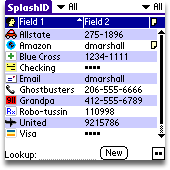
2. Splash ID.


So, it's monday morning and I am up at 5am. I go downstairs for a cup of coffee, listen to the morning news and catch up on some office work. I then run for a half-hour and drive to the
hospital. I receive a call that Ms. Sickly is in the hospital while on my way to the office. I detour and sit to check her data on our computers. I suddenly forget my password, one of 7 that I have to remember and it just so happens, one that I do not use every day, having had no admissions in about 3 weeks. I reach into my pocket and find out that I do not have the PRECIOUS !!! It is still at my bed acting as an alarm clock!

I eventually get the necessary data and return to the office. But at the sight of the last patient leaving for the morning session, I am in my car hurrying back to the house! Why? Because without Splash ID, I have a very good chance of running into the same scenario without being able remember the passcodes for the day or getting help from someone.

If you have to run home at lunch time to get a piece of software, then you know that this product has to be listed in the top 2 of all programs for your Lifedrive. It is so essential that I sometimes question how many times I should back up the data. Once, I even questioned if backing up the data, overwriting the preexisting backup file, will corrupt the backup file! ?

Since November, I have had to have a backup plan! I have chosen to use two other encryption programs not found on the Lifedrive, just in case the day occurs and I have no Splash ID to fall back on.

This is again an essential piece of software, not just for the Lifedrive, but for ALL PALMS!


....drumroll, please, the number one accessory, either Hardware or Software for the Lifedrive is:


1. The Sandisk Ultra II 1- gig SD Card with USB.

This, my friends, is my number one pick for the Lifedrive. This product fulfilled all criteria in terms of necessity, ease of use and frequency.
First, before my family gave me an ipod for Christmas, this was my ipod-killer! It actually created a need. I had to purchase an in-car device to keep the Lifedrive charged while I listened to Podcasts, lectures and music.

So, I can hear everyone who does not own a Lifedrive questioning "why would you need this if you have a Lifedrive and 4 gigs of memory on a hard drive?" The answer to this is not quite that simple. But let's just say that trying to play your songs, podcasts etc from the hard drive was quite problemmatic. There are several delay points and eventual hard resets which make this a thankless task. I wrote something about this a while back (Which Memory do you serve?)

The drive of the Lifedrive is good for one thing --- Storage! Take a picture on your 1 gig SD card and transfer it immediately to the Lifedrive or download a file or a podcast directly to the SD card via USB - for those times when you do not have a cable - and voila it is accessible immediately.

There are a few drawbacks to the SD card approach, but this is mainly a problem with older computers. First, there is sometimes a physical limitation in inserting the SD card into the USB slot. This can be thwarted by using a USB extension or hub, but that defeats the simplicity factor. Secondly, it appears that it works best with just about all USB 2.0 and somewhat touch and go with USB 1.0 or 1.1. Other than that, this is a God Send.

I remember when I had to have a document downloaded as quickly as possible, along with a podcast that I wanted to listen to, on my way to a conference. I was able to go to the website and download the podcast to the SD card, drop my windows document, in the space of 2 minutes to the card and away I went, listening to a CME podcast on my way to a meeting and having the document and speech ready to go. No wires. Additionally, no Itunes aggregator to fool around with, just drag and drop.

The SD Ultra with USB card completes an incredible trifecta of download options what I consider a part of the essentials: The usual linked approach with wires , the wireless simplicity of bluetooth and 802.11 and the aforementioned SD/USB approach. This product makes the Lifedrive a very good tool to own.


Lifedrivedoc's Honorable Mentions:

.
Epocrates

Sensational program for the Palm, with automatic updates. Reason not listed in the top 5: They now have a desktop copy that is even better than the Palm version. I find myself using that a lot more. But if I am on the road or in the hospital, it is still the Lifedrive version that I use.

.
Mobisystem's Office Suite.

I use this as my default word processing and spreadsheet reader and creator. However, it's core products - spreadsheet and word processing are spoiled by the lack of integration of its Database product and drawing program, which crashes the Lifedrive. Additionally, the Database program is not as good at "input" data as it is in comparatively using data. It is pretty and has a lot of "cool" features, but is much better suited as an advanced slide show or picture database program.

I have yet to upgrade to version 7, given the fact that they are using the Opensource PDF maker and viewer which has been notoriously unstable on the Lifedrive. Thus, Mobisystem's Office Suite did not make it into the top 5 this year.

.
Googlemaps.

I went gaa-gaa over this product late last year. A brilliant concept and an even more brilliant program, it is unfortunately only useful to you if you have a very high capacity data mobile plan or plan to do your geomapping from inside of a coffee shop or free wifi area. But it is gorgeous.


.
Pennovate Notes.

A fantastic application. It allows me to use my crabscratch handwriting and save the finished document as a jpg file. Priceless during CME lectures or for jotting down something very quickly. Why is it not in the top 5? Lack of room. I have no negatives to report on this product. It's worth every penny.


.
Rhinoskin Lifedrive Case.

Yes, I do love this case. Infact I am using it now. It has one major asset: A lot of room for saving those SD cards. Additionally, it has a faster access time than the original Palm metal case. So why is the Palm Lifedrive case in the top 5 and Rhinoskin getting honorable mention? On the grand scheme of things, if I dropped the lifedrive in the Rhinoskin, it's goodbye Lifedrive. Beauty gets you only so far.

.
Riley's Kidometer.

An amazing database of facts for children's statistics. Is that heart rate normal for a 3 month old? Is that CBC correct in the newborn? All of these questions are answered in the Riley Kidometer. It is one of the best programs ever written for the Palm. So why is it not in the top 5? Well, I use it only about once per week or two weeks. Again, I have no qualms with this program. It is programming at its best.


Disclaimer: As always, all opinions are mine and there was and is no reciprocal reimbursement or commercial endorsement of any product. I have received no financial or other gains from this report. - LDD.

LDD.